
Manage your WordPress sites
by talking to them.
Tell Claude, the AI made by Anthropic, what you need in plain words. It works on your server like an experienced WordPress developer: it finds the cause, shows you each change before it makes it, and checks the result. A restore point comes first, so anything can be undone in one click.
- A restore point before every task
- You approve each change
- No subscription, pay per use
- No coding needed
Works on every server in your account
-
 DigitalOcean
 -
 Vultr
Vultr -
 Hetzner
 -
 Rabbitflare Edge
 - Your own servers
- to undo a whole task, from the restore point saved before Claude starts
- 1 click
- for a real task that changed a site's title, start to finish, with Claude Sonnet 5.5
- $0.04
- No subscription. Credits from $5, used only as Claude works
- $0 a month
- Claude Sonnet, Opus and Fable, each with 5 levels of effort
- 3 models
Plain words in, real work out
You talk to Claude.
Claude talks to WordPress.
Claude knows WordPress inside out: WP-CLI, PHP, the database, the logs and the code. Describe what you need in your own words, and Claude has the technical conversation with your site for you.
You and Claude, in plain words
Our homepage shows “There has been a critical error on this website”. Can you fix it?
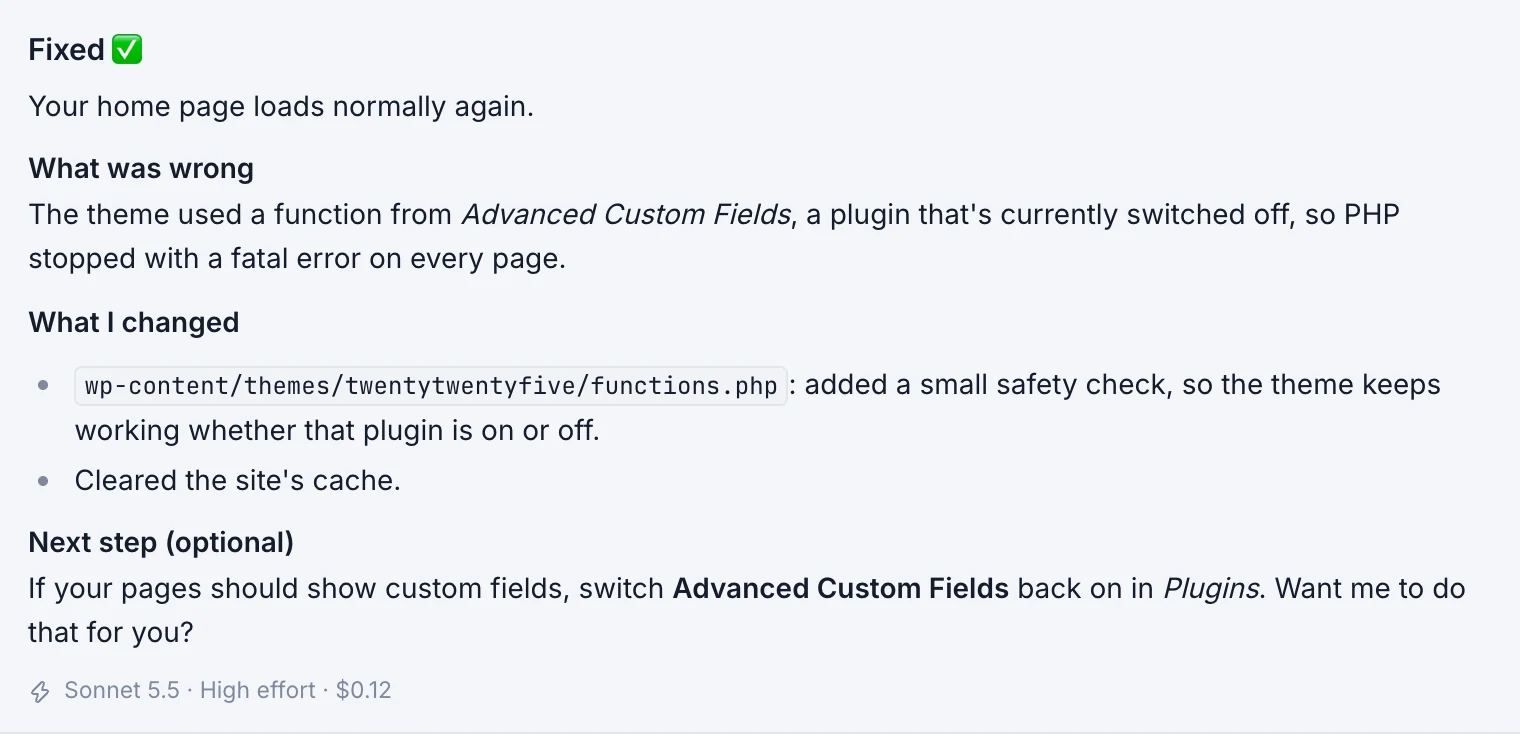
Found it: your theme uses a function from a plugin that's switched off, so every page crashed. I added a small safety check and cleared the cache. Your homepage loads again.
Claude and your site, in WordPress's language
- $ wp core version && wp plugin list
- advanced-custom-fields inactive
- $ tail -n 40 logs/php-error.log
- PHP Fatal error: Call to undefined function get_field()
- ✎ themes/twentytwentyfive/functions.php approved by you
- + if ( ! function_exists( 'get_field' ) ) { … }
- → clear the cache
- → load northwind.shop as a visitor
- 200 OK · no errors
What you can ask
Anything you'd ask a WordPress developer.
Fixes, new features, design changes and server care, in your own words. Claude works on the server itself, with the tools a developer would use: WP-CLI, PHP, the logs and the code.
-
Fix errors
White screens, PHP errors, broken plugins and “critical error” pages: found in the logs and fixed.
For example
My homepage says “There has been a critical error on this website”. Find out why and fix it.
-
Change the design
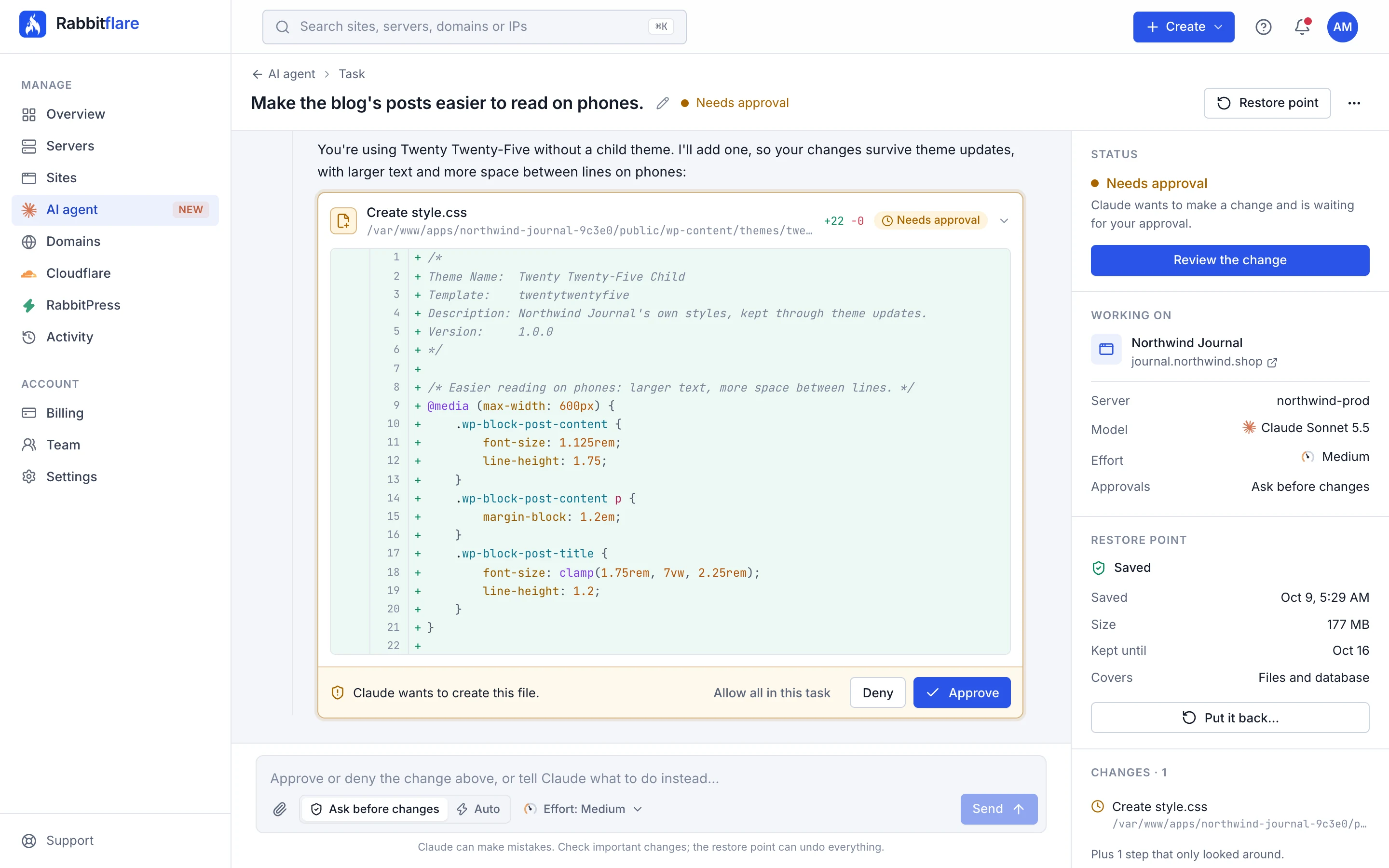
Colours, layouts, headers and footers, done the right way with a child theme, so updates don't undo them.
For example
Make the header stay at the top when people scroll, and the buttons our brand green.
-
Build custom plugins
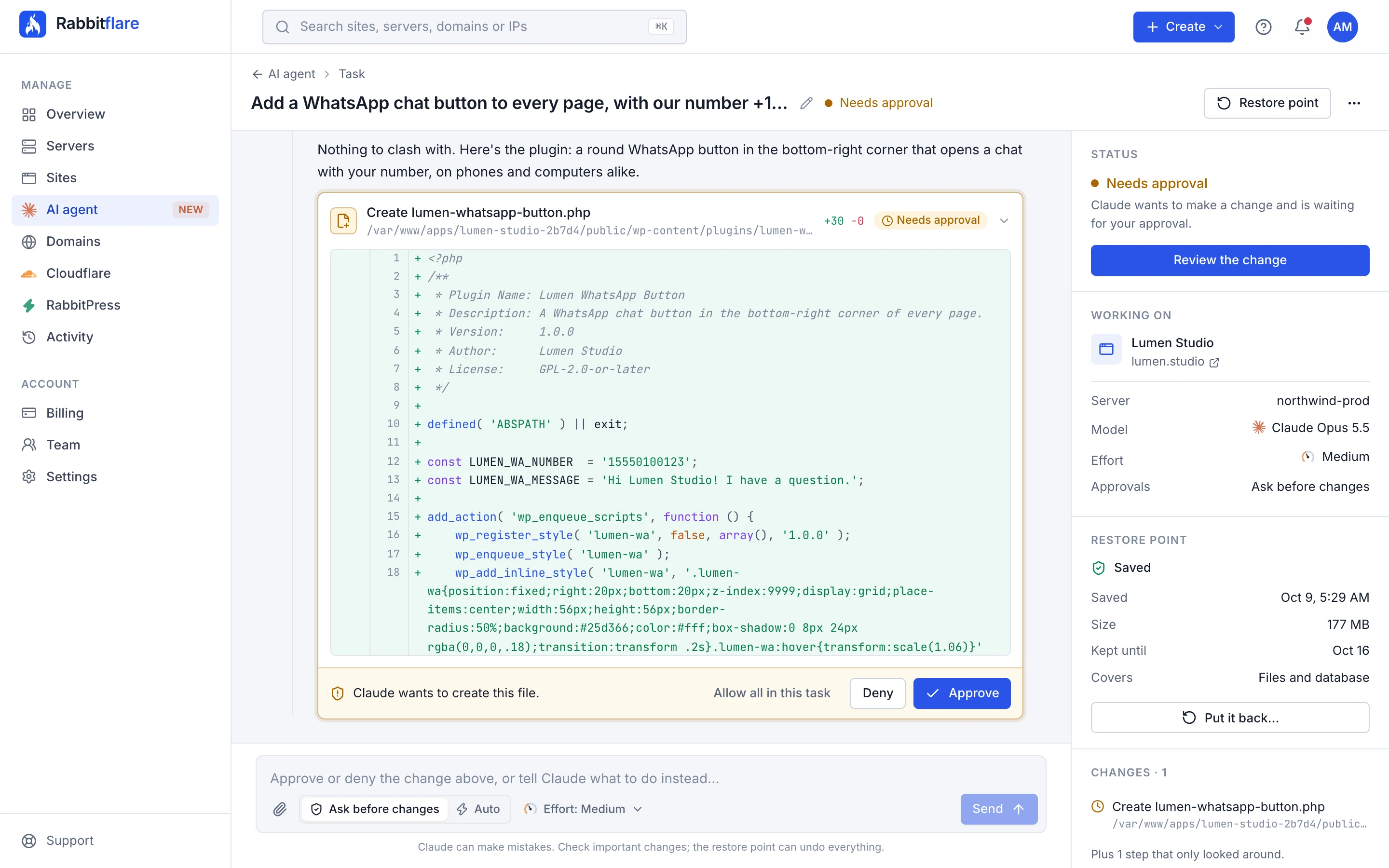
Describe a feature; Claude writes a small, clean plugin for it, switches it on and tests it.
For example
Add a WhatsApp chat button to every page, with our number.
-
Speed up your site
Slow pages, heavy plugins, database clean-up and caching, measured before and after.
For example
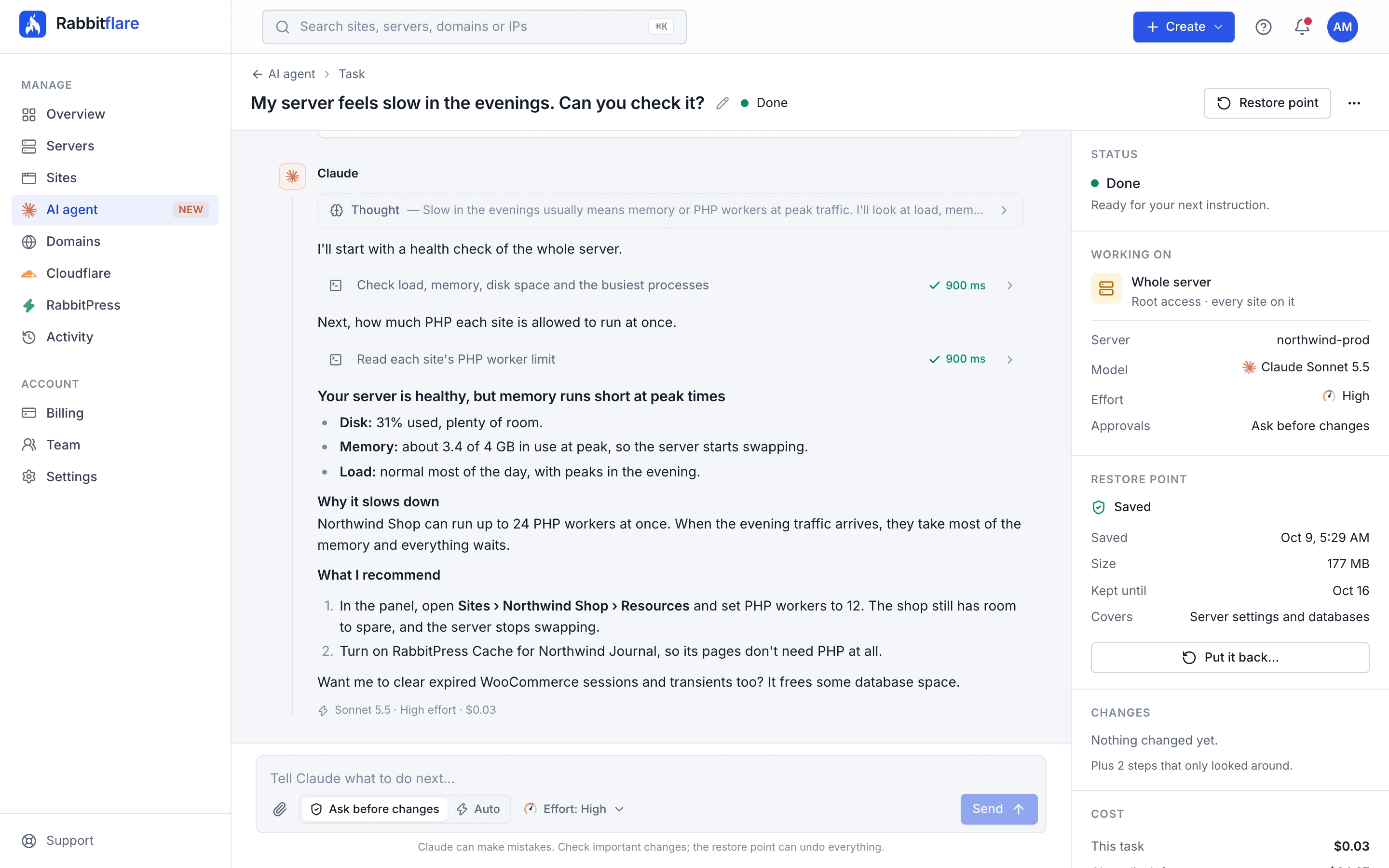
The shop feels slow. Find out what's slowing it down and fix what you safely can.
-
Clean up malware
Suspicious files and injected code found and removed, with advice to keep it out.
For example
Google says my site may be hacked. Check it for malware and clean up anything you find.
-
Look after your servers
PHP, memory, disk space and services, in a whole-server task with root access.
For example
My server feels slow in the evenings. Can you check it?
How it works
From one sentence to a finished job.
Every task follows the same careful steps, so you always know what's happening, and nothing changes behind your back.
-
1 Step 1 of 4
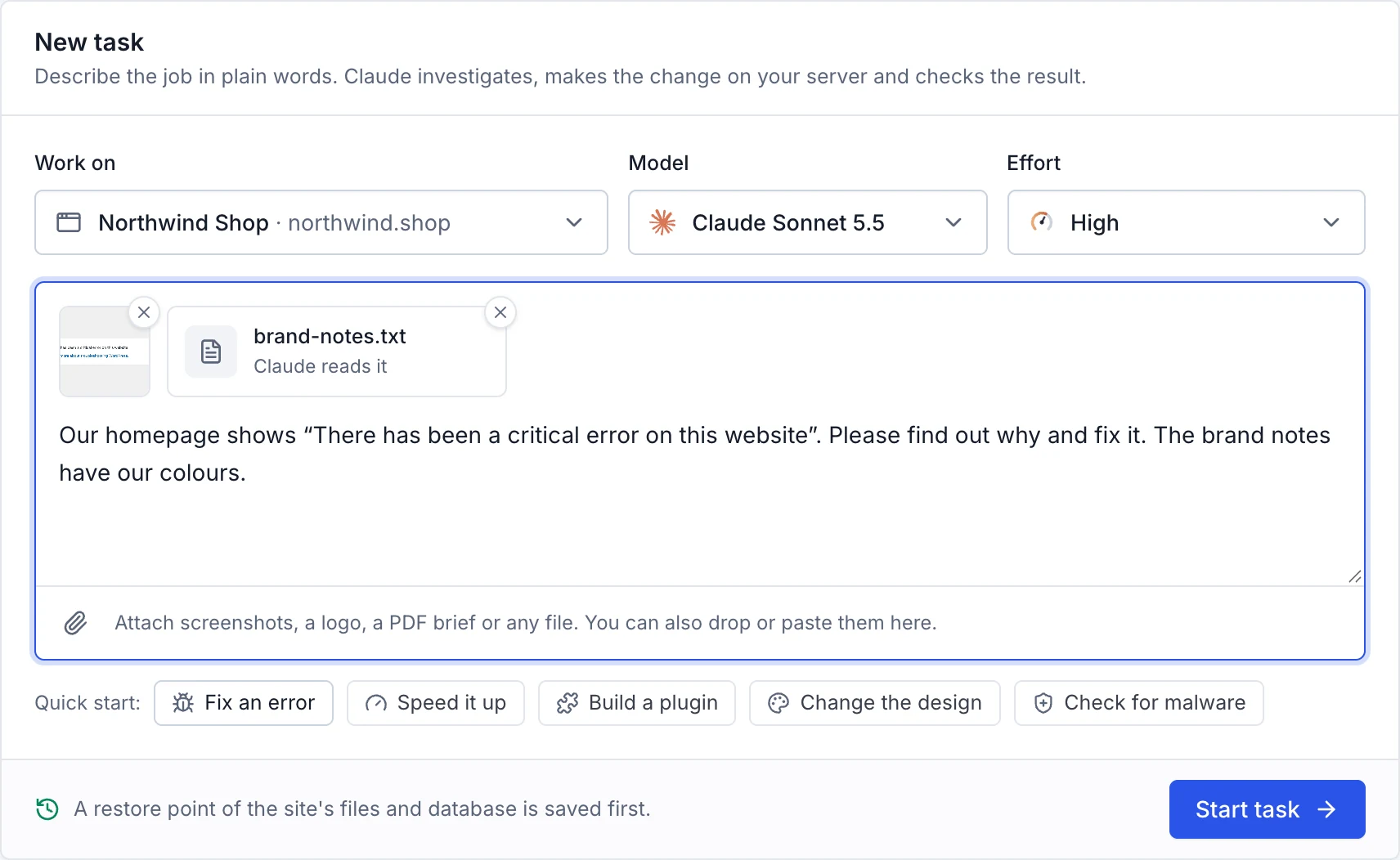
Describe the job
Choose a site, or the whole server, then say what you need the way you'd brief a developer. Name the page, the plugin or the error if you know it, and add screenshots or files.
- One site, or a whole server
- Quick starts for common jobs
- Screenshots, PDFs and files
-
2 Step 2 of 4
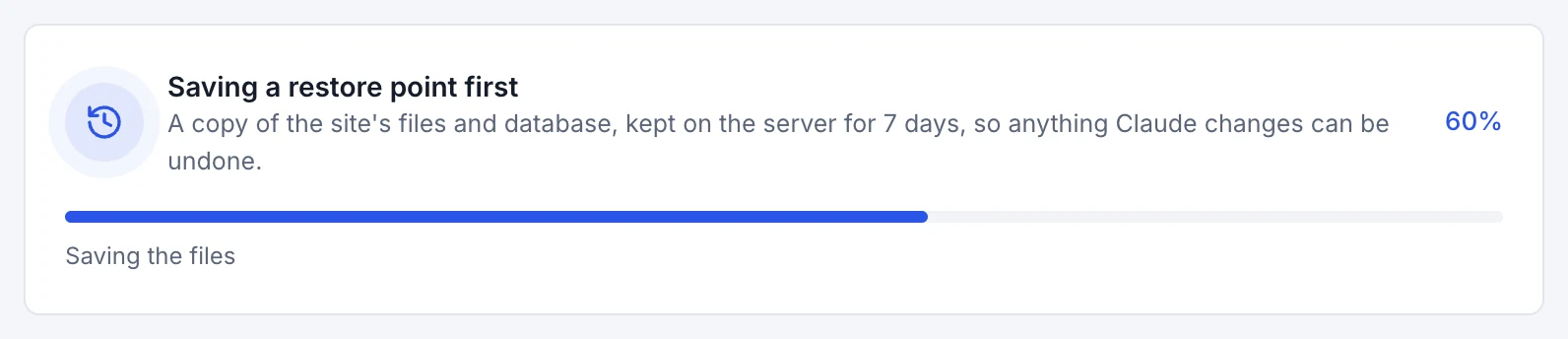
A restore point, first
Before Claude touches anything, the task saves the site's files and database on the server. Claude starts only once it's ready, and for 7 days one click puts everything back.
- The site's files and database
- Kept on your server for 7 days
- No restore point, no start
-
3 Step 3 of 4
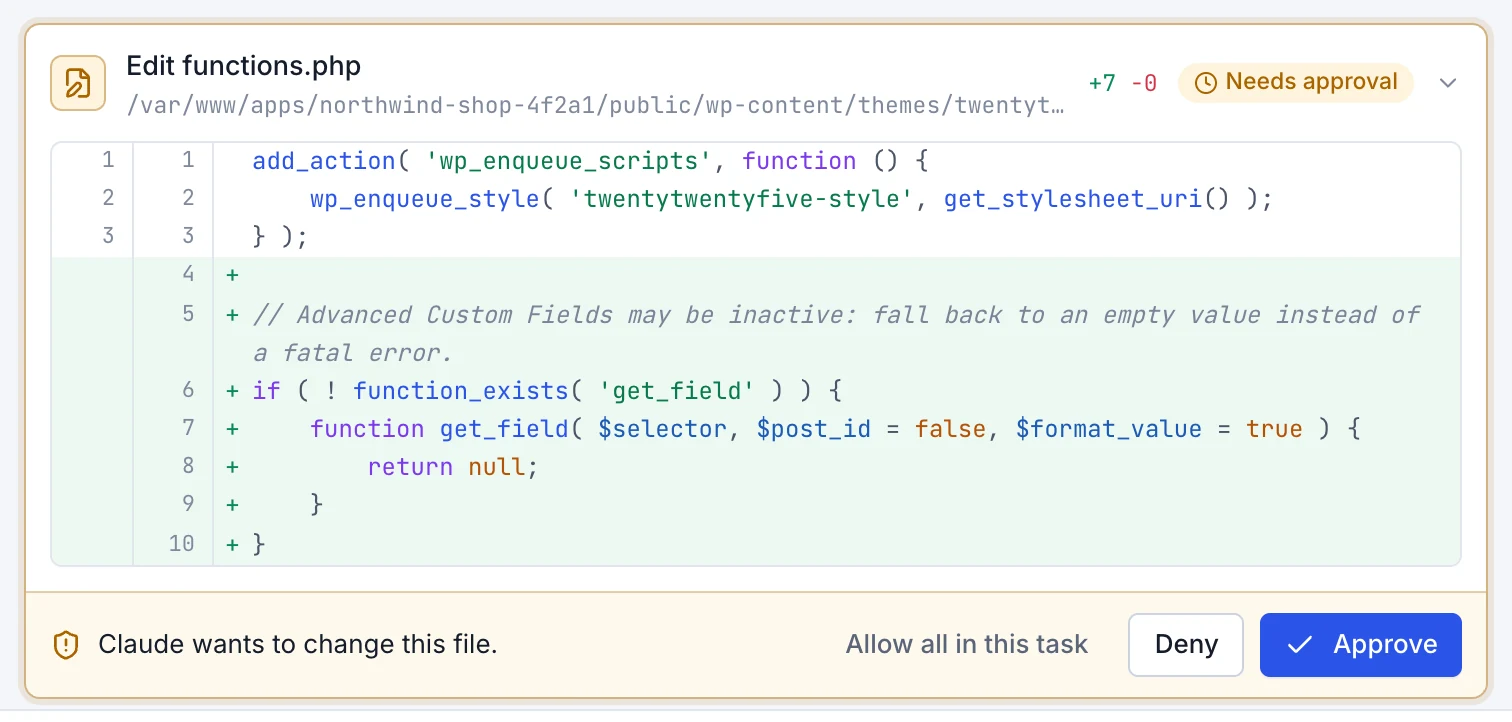
Claude investigates, you decide
Claude reads the logs, the code and the settings, and anything that only looks runs straight away. Anything that changes something waits for you, with the exact command or the lines of code in red and green.
- Approve, deny, or allow all
- Denied means it won't try again
- Stop it at any moment
-
4 Step 4 of 4
Checked and explained
Claude tests the result the way a visitor would, then tells you in plain words what was wrong, what it changed and what to check. Every reply shows exactly what it cost.
- Tested before it says it's done
- Plain words, not jargon
- The cost of every reply
See it at work
Four jobs, start to finish.
Screens from the AI agent in the Rabbitflare panel, on an example account. Pick a job to see how Claude handles it: what it checks, what it changes, and how it tells you.
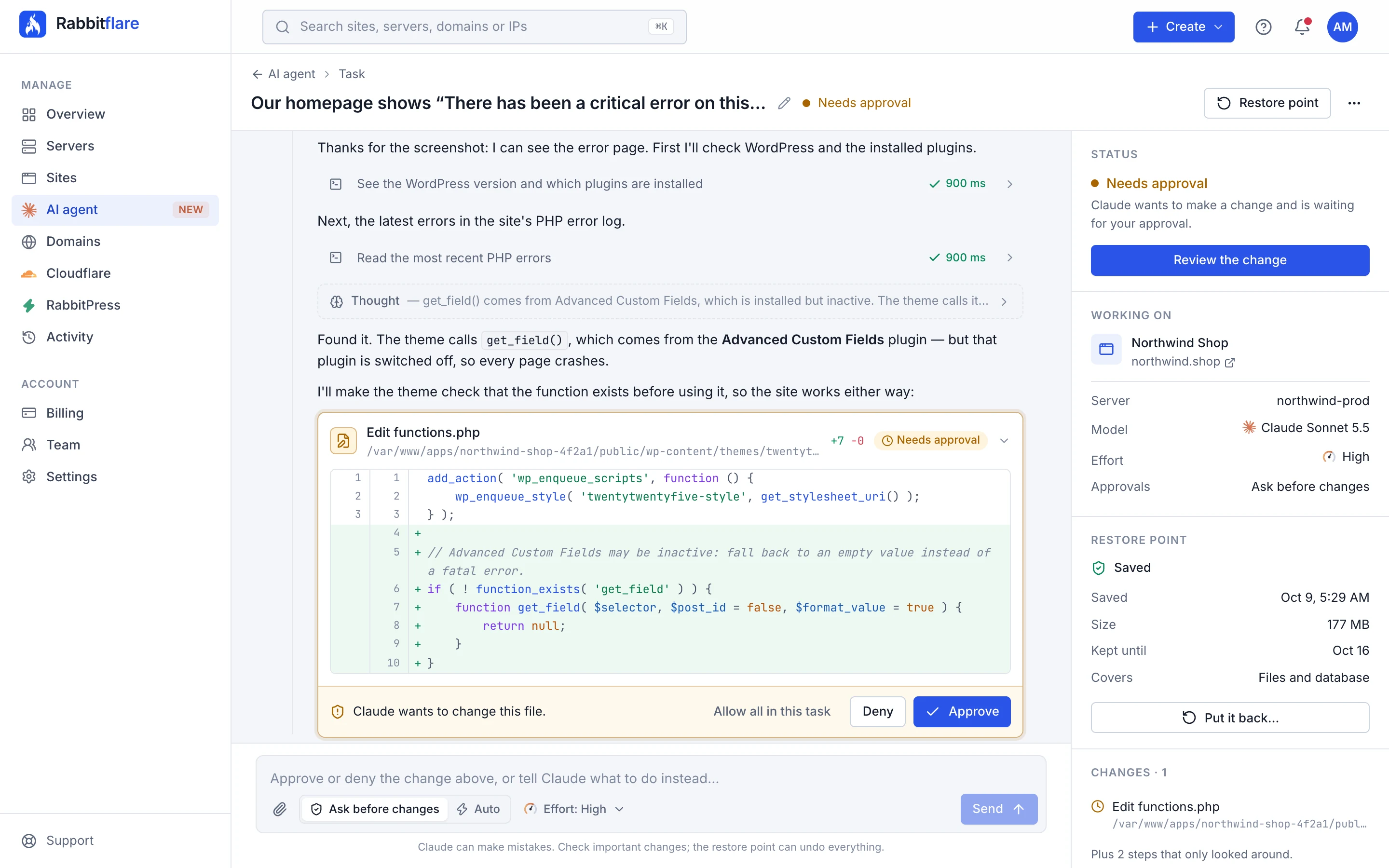
A broken homepage, found and fixed
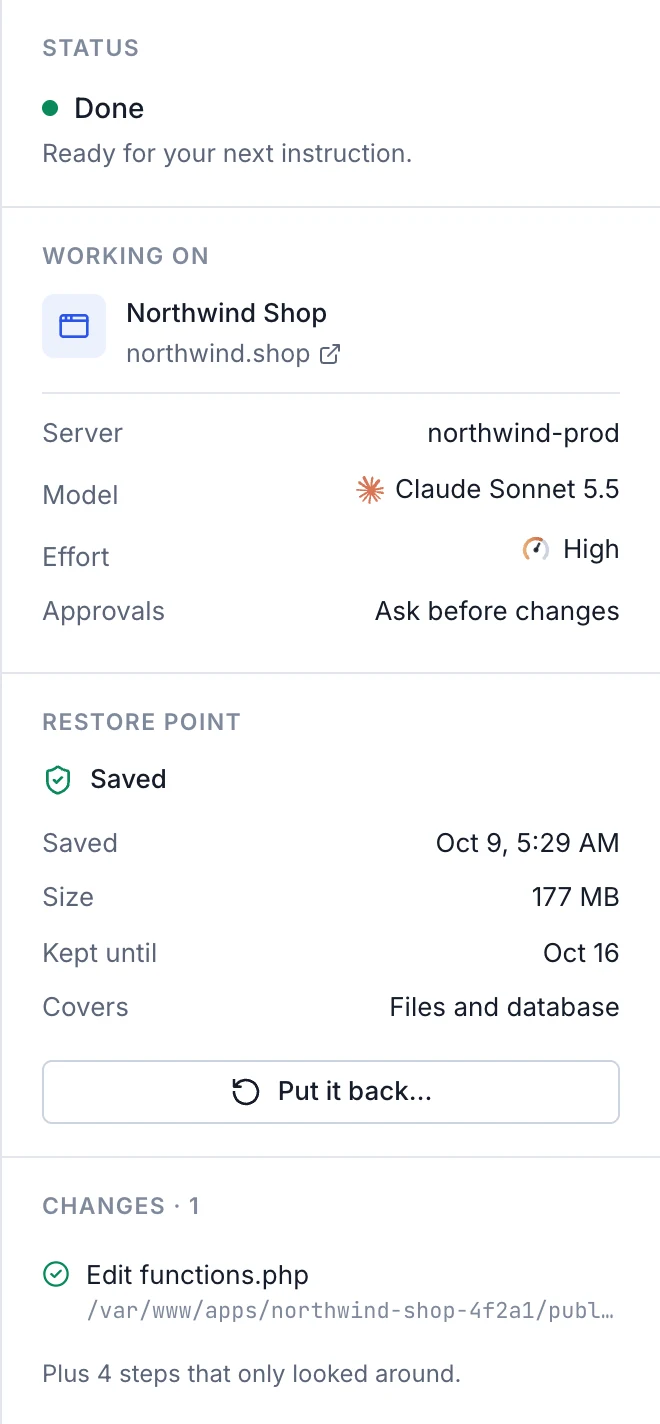
A screenshot of the error was enough to start. Claude read the PHP error log, found a theme that relied on a plugin that was switched off, added a safety check, cleared the cache and loaded the page as a visitor would. Then it explained it all in plain words.
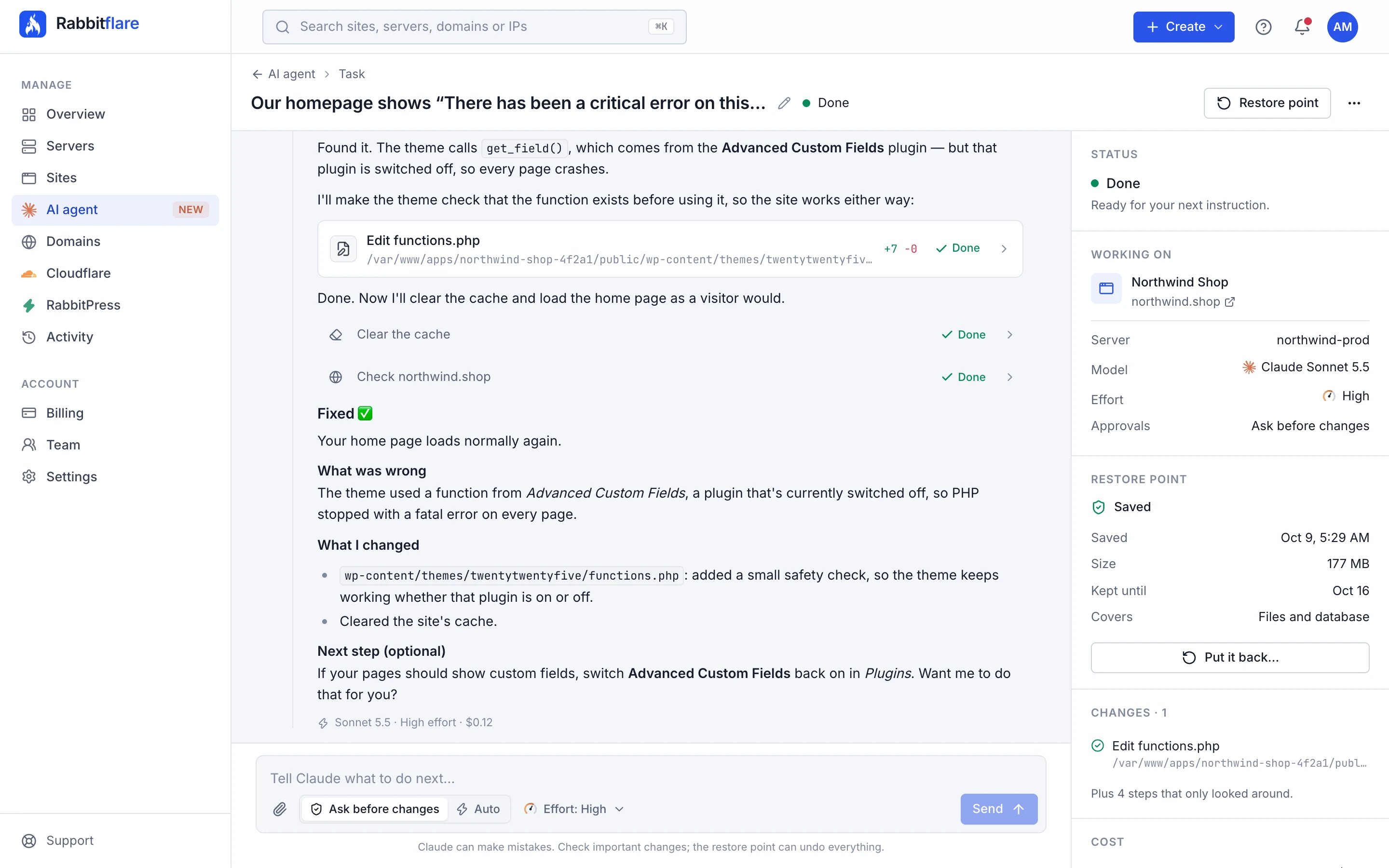
- Finds the cause in your logs
- The smallest change that fixes it
- Checked before it says it's done
Safe by design
Built to be trusted with a live site.
An AI that can change your site should come with guard rails. These are built into every task, whatever the model and whatever the job.
-
A restore point, every time
Each task saves the site's files and database before Claude starts. Whole-server tasks save the server's settings and every site's database.
-
Nothing changes without your OK
Claude looks around freely, but every change waits for your approval, unless you choose Auto for a task.
-
Kept in its lane
Site tasks run as the site's own user, so they can't reach your other sites or the server's settings. Server tasks can't touch SSH or Rabbitflare's own tools.
-
Secrets stay hidden
Database passwords and WordPress keys are replaced with placeholders before anything reaches Claude, and filled in only when a command runs.
-
Not used for training
What you share in a task is sent to Anthropic, the maker of Claude, to create replies. It isn't used to train their models.
-
On the record
Every task and every change Claude makes is in your account's activity, and on the site's or server's own.
Claude can make mistakes, like any developer. That's why every task starts with a restore point, why you see each change before it runs, and why you can stop it at any moment.
Screenshots and files
Show it, don't just describe it.
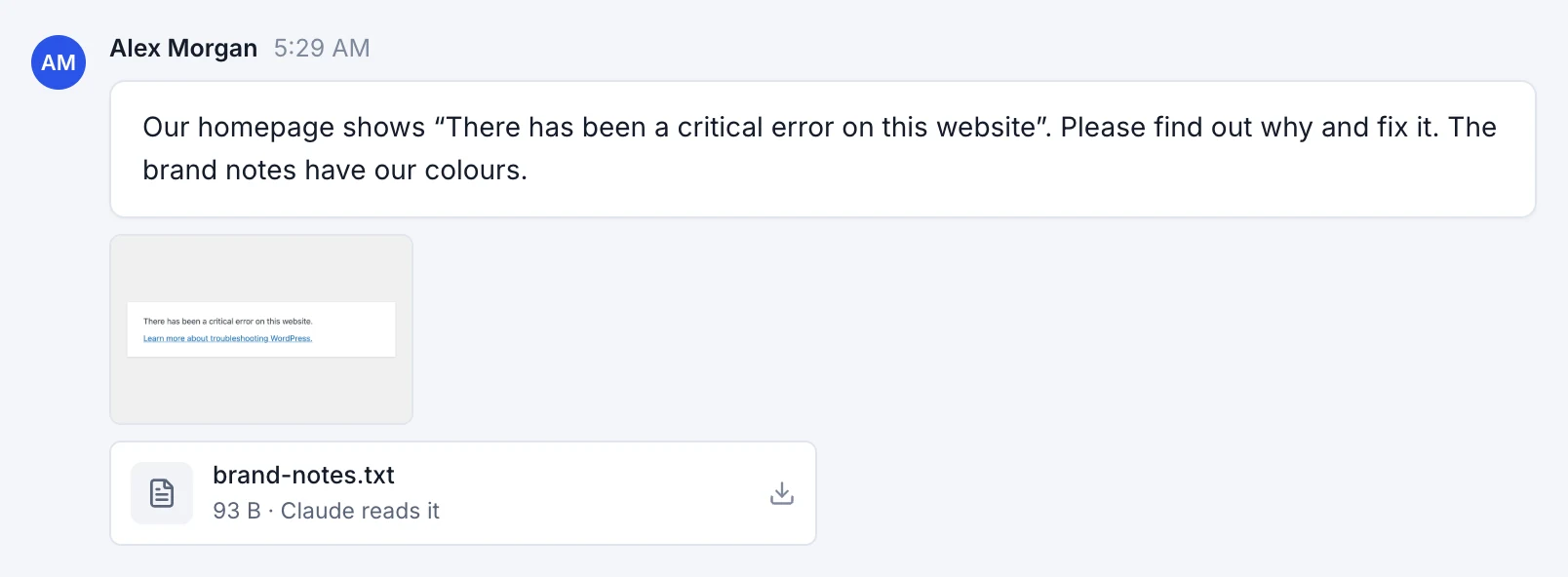
Paste a screenshot of the error, attach the design you want, your logo, a PDF brief or a theme's zip file. Every file is also saved on your server, so Claude can use the real thing.
Up to 5 files a message, 10 MB each
Drag them in, or paste a screenshot straight into the box
- Images
- Claude sees them: a screenshot of an error, a design to copy, a logo to use.
- PDFs
- Claude reads them, up to 5 MB: a design brief, a list of changes.
- Text and code
- Notes, CSV files, PHP, CSS and JavaScript, up to 200 KB.
- Anything else
- Zip files, fonts and the like are saved on your server, for Claude to use with its tools.
Powered by Claude
Choose your Claude.
The AI agent runs on Claude, the family of AI models made by Anthropic. Pick the model that suits the job, and how hard it works on each reply.
- Recommended
Claude Sonnet 5.5
Fast and capable for everyday work
Best for
Plugin and theme changes, PHP errors, content and settings
- Speed
- Fastest
- Starts at
- High effort
$4 in / $20 out
per million tokens
-
Claude Opus 5.5
Deeper reasoning for harder problems
Best for
Custom plugins, tricky bugs, performance and server issues
- Speed
- Fast
- Starts at
- Medium effort
$8 in / $40 out
per million tokens
-
Claude Fable 5.1
Anthropic's most powerful model
Best for
Complex builds, migrations and long, multi-step jobs
- Speed
- Thorough
- Starts at
- High effort
$20 in / $100 out
per million tokens
Five levels of effort.
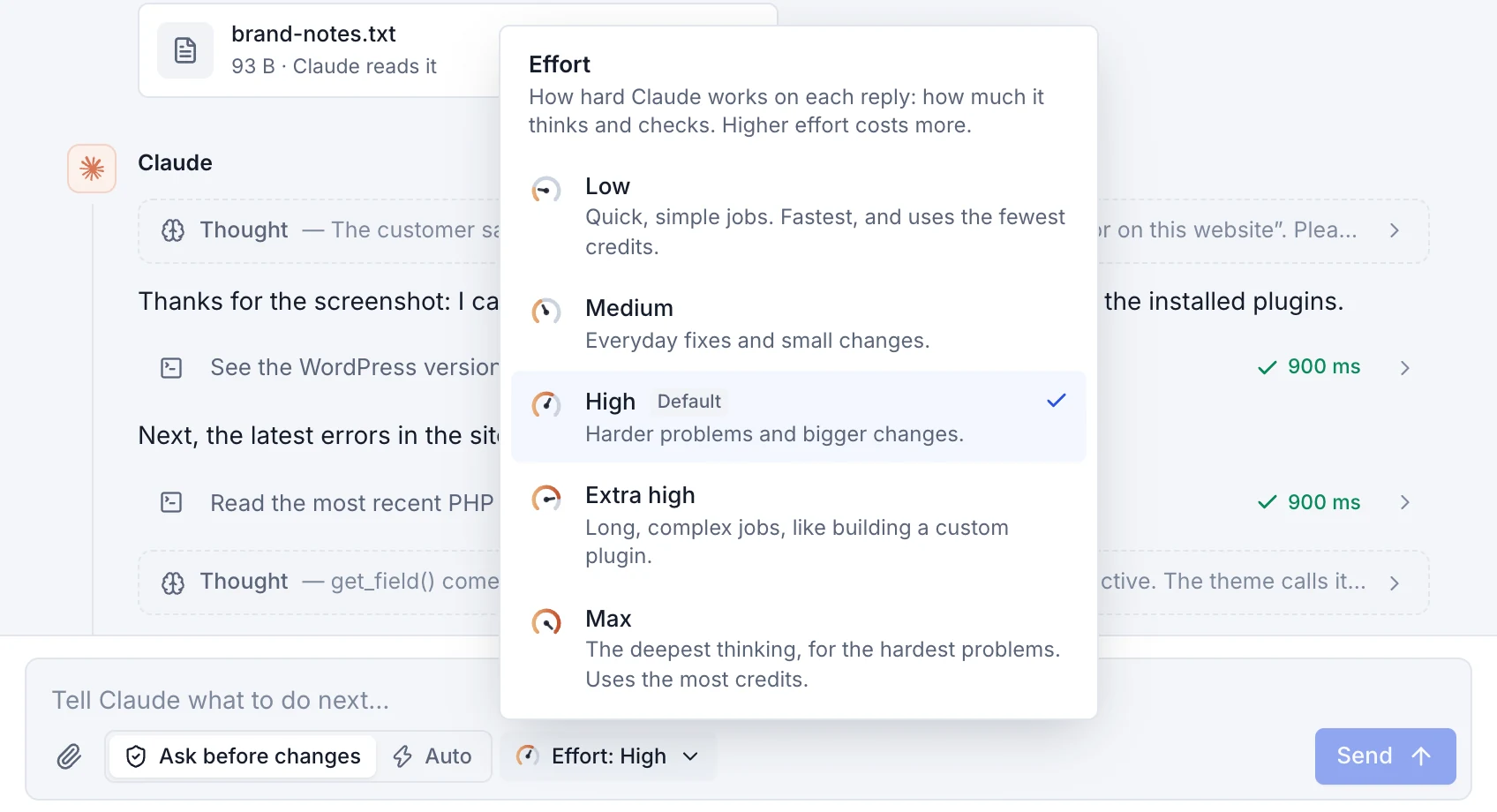
Effort is how hard Claude works on each reply: how much it thinks, how many steps it takes and how carefully it checks. Higher effort suits harder problems and uses more credits. Change it at any time, for your next messages.
-
Low
Quick, simple jobs. Fastest, and uses the fewest credits.
-
Medium Opus 5.5 starts here
Everyday fixes and small changes.
-
High Sonnet 5.5 starts hereFable 5.1 starts here
Harder problems and bigger changes.
-
Extra high
Long, complex jobs, like building a custom plugin.
-
Max
The deepest thinking, for the hardest problems. Uses the most credits.
You're in charge
See everything. Stop anything.
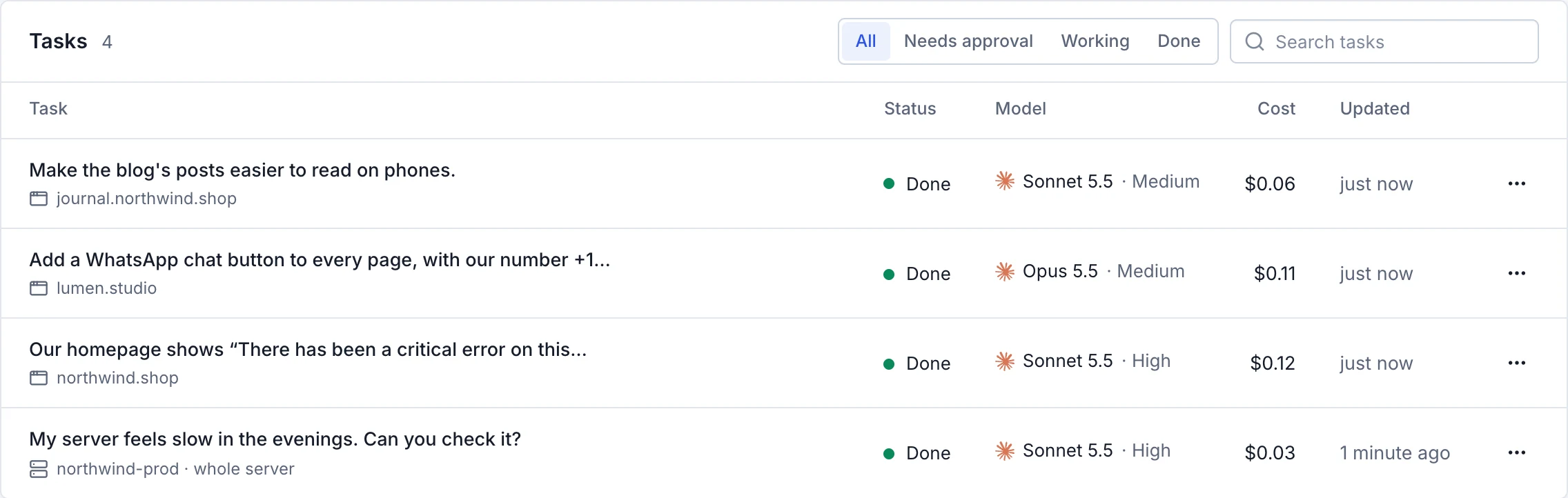
Follow Claude's work as it happens, step in whenever you like, and decide how much it may spend. Every task stays in one list, with its status and what it cost.
-
Follow every step
Each command it runs, each file it opens or changes, and what it's thinking, as it happens.
-
Stop at any moment
Stop Claude at once, even in the middle of a command. Send a message when you want it to carry on.
-
Ask, or Auto
Tasks start in Ask before changes. Switch a task to Auto when you're happy for it to carry on alone, and back at any time.
-
Effort for each message
Raise the effort for a hard step and lower it for an easy one. It applies from your next message.
-
The cost of every reply
Each reply shows the model, the effort and what it cost, and the task list shows what each task cost in all.
-
A monthly limit
Set what the AI agent may spend each month. Claude stops before a reply would go over it.
Pricing
No subscription. Pay only for what Claude uses.
Add AI credits and they go down only as Claude works. You see what every reply cost, and you decide how much it may spend.
AI credits
Pay as you go$0 a month
No plan to choose and nothing to cancel. Credits pay for Claude's replies, as it works.
- Add credits from $5, by card or from your wallet
- Credits never expire
- Automatic top-ups when they run low, if you like
- A monthly spending limit that you set
- The cost of every reply, as it happens
Prices per million tokens
What Claude reads (input) and writes (output). A million tokens is roughly 550,000 words.
-
Claude Sonnet 5.5
$4 input · $20 output
Cache: $5 write, $0.20 read
-
Claude Opus 5.5
$8 input · $40 output
Cache: $10 write, $0.40 read
-
Claude Fable 5.1
$20 input · $100 output
Cache: $25 write, $0.50 read
As a task goes on, the conversation so far is mostly read from the cache, at the much lower cache price. Images, PDFs and higher effort use more tokens.
A real task that changed a site's title, start to finish, with Claude Sonnet 5.5. You see the cost of every reply as it happens.
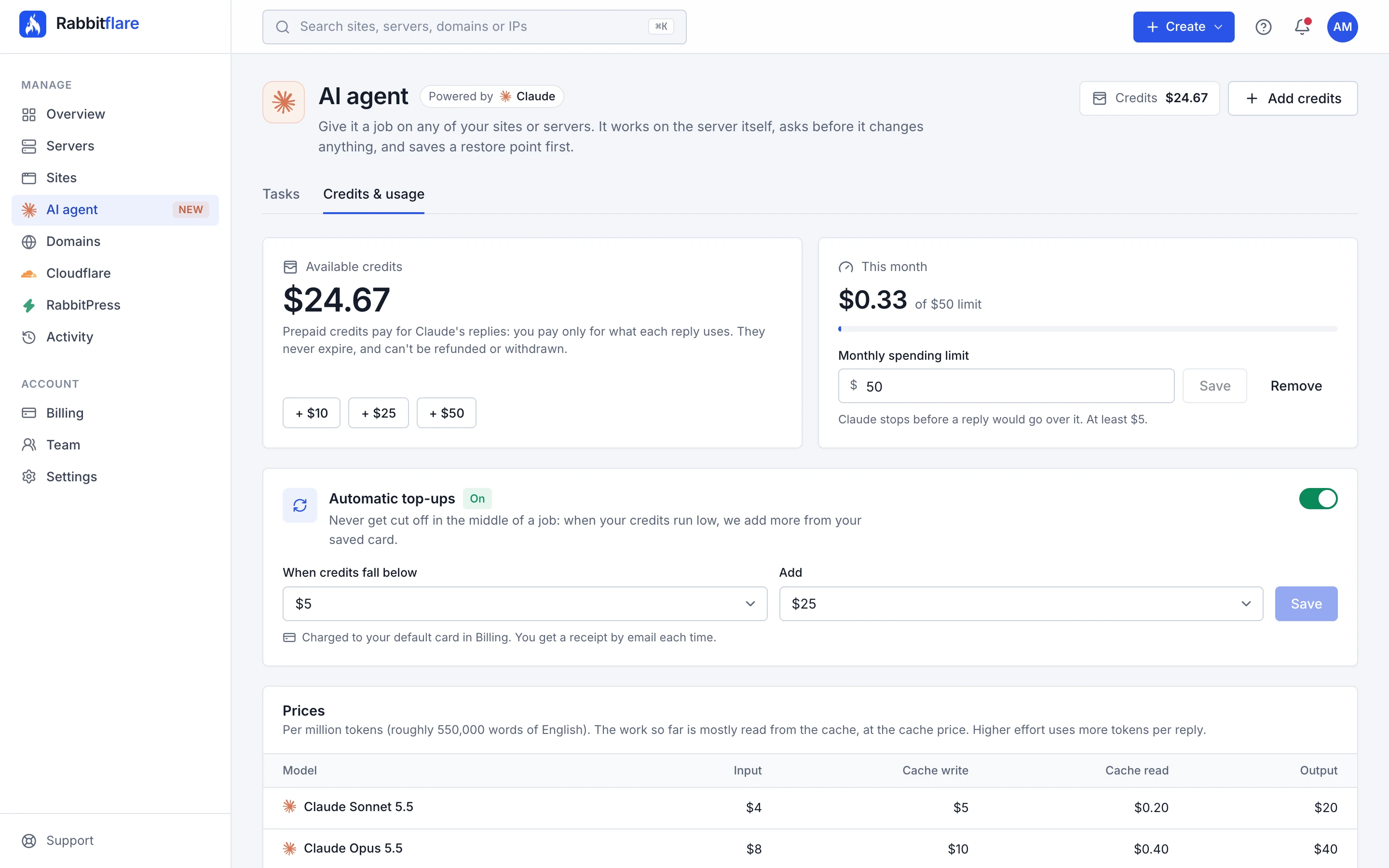
Credits & usage: your balance, a monthly limit, automatic top-ups and every price.
AI credits are prepaid, separate from your hosting bill, and can't be refunded or withdrawn. The AI agent works on the sites and servers in your Rabbitflare account.
What is the AI agent?
An assistant in the Rabbitflare control panel that does jobs on your WordPress sites and servers. You describe what you need, and Claude, made by Anthropic, works on the server itself: it reads the logs and the code, finds the cause, makes the change, checks the result and explains what it did.
Do I need to know how to code?
No. Describe what you want in plain words, the way you'd tell a person. Claude explains what it found and what it changed in plain words too, and you can ask it to explain anything you're not sure about before you approve it.
Could it break my site?
Claude can make mistakes, like any developer. That's why every task starts with a restore point of the site's files and database, why each change waits for your approval, and why one click puts everything back. Site tasks can't reach your other sites or the server's settings, and you can stop Claude at any moment.
What does it cost?
There's no subscription. You pay for what Claude reads and writes, from prepaid AI credits, at each model's price per million tokens, and you see the cost of every reply. A real task that changed a site's title cost $0.04 with Claude Sonnet 5.5. Bigger jobs, more powerful models and higher effort cost more, and a monthly limit keeps spending in check.
Which model should I choose?
Start with Claude Sonnet 5.5 at its default effort: it's the fastest and handles most everyday jobs. Choose Claude Opus 5.5 for tricky bugs and custom plugins, and Claude Fable 5.1, Anthropic's most powerful model, for complex builds and long, multi-step jobs.
Is my data used to train AI models?
No. What you share in a task, including files and data Claude reads on your servers, is sent to Anthropic, the maker of Claude, to create replies. It isn't used to train their models. Database passwords and WordPress keys are replaced with placeholders before anything is sent.
Which sites and servers can it work on?
Any site or server in your Rabbitflare account: DigitalOcean, Vultr, Hetzner and Rabbitflare Edge servers, and servers you connect yourself. A task works on one site, as that site's own user, or on a whole server, as root, with Rabbitflare's own parts protected.
Is there anything it won't do?
What the panel manages stays with the panel: domains, SSL certificates, DNS, the CDN, the firewall's settings, backups, staging, cloning, site resources and PHP settings, cron jobs, and server power and resizing. If a job needs one of these, Claude tells you where to find it in the panel.
Is a restore point the same as a backup?
No. A restore point is saved on the server for 7 days, only to undo a task. For copies kept away from your server, turn on site backups in the panel.
Can my team use it?
Only the account owner can, because it spends the account's credits and works on its servers. Team members don't see it.
What happens to credits I don't use?
They stay in your account: credits never expire. They can't be refunded or withdrawn, so start small. $5 is enough to try it.
Manage your WordPress sites by talking to them.
Switch on the AI agent in your panel, add credits from $5, and give Claude its first job. Every task starts with a restore point, so you can try it with confidence.
Already with Rabbitflare? Open the AI agent