Free up your server.
Keep every link.
Media Offload keeps your WordPress uploads in cloud storage and serves them from the very same addresses. Your server gets its disk back, and your pages, plugins, CDN and search rankings don't notice a thing. Turn it on in one click: 100 GB comes with every cloud server.
- 100 GB included with every cloud server
- Every file keeps its address
- Turn it on in one click
- No download fees
Included with every server on
-
 DigitalOcean
 -
 Vultr
Vultr -
 Hetzner
 -
 Rabbitflare Edge
- of storage included with every Rabbitflare cloud server, shared by its sites
- 100 GB
- to change: every file keeps its address, so pages, plugins and search engines see no difference
- 0 links
- for a new upload to reach storage, checked against its SHA‑1 checksum
- 1–2 min
- to get back any file you delete or replace in WordPress
- 30 days
One address. Your server finds the file.
Your uploads are copied to cloud storage, and your server learns one new trick. When a visitor asks for a file that's no longer on its disk, nginx fetches it from storage and sends it on, in the same request, from the same address. Nothing in WordPress, your pages or your database is rewritten.
What happens when…
- Images JPEG, PNG, WebP, AVIF, GIF, SVG
- Video MP4, MOV, WebM
- Audio MP3, M4A, WAV, OGG
- Documents PDF, Word, Excel, PowerPoint, text
- Archives ZIP, RAR, 7z, tar
- Fonts WOFF2, WOFF, TTF, OTF
Always on the server: private downloads and form uploads, backups and logs, code.
copied within about 2 minutesasked by your visitors, at the same address
checked against its SHA‑1 as it arrivesnot needed: the file is on the diskfetched in the same request
- 100 GB included with every cloud server
- Every file checked against its SHA‑1
- Private, and encrypted at rest
- Deleted or replaced files kept 30 days
visitors and your CDN ask your server, at the same address as always
Copied to storage within about two minutes and checked against its SHA‑1 checksum. In Free up disk mode it stays on the server for the days you choose first, then lives in storage only. The file is on the server's disk, so it's sent from there, exactly as it always was. The file isn't on the disk any more, so nginx fetches it from storage and sends it on in the same request. The server keeps a copy for a week, so the next visitors get it straight away.
Nothing changes in how you or your team upload. Same address. Same file. Nothing to change on your site.
- No URL rewriting and no database changes, ever
- Your CDN and caching keep working exactly as they are
- Fetched files are kept on your server for a week, so repeat visits are quick
- WooCommerce downloads and form uploads always stay private on the server
Check it yourself. Every file from storage says so.
Open any image from your site in a new tab, then your browser's developer tools and the Network tab, and reload. A file that lives in storage arrives with x-rabbitflare-media: storage, and with the same status, type and caching as a file from the server's disk.
Response headers
- HTTP/2 200
- server: nginx
- content-type: image/webp
- content-length: 254146
- cache-control: max-age=2592000
- cache-control: public
- x-rabbitflare-media: storage
Delivered
From storage
through your own server, at the same address
- Address unchanged
- Server disk not there
- Cloud storage fetched
- Copy kept on the server 7 days
More room
Media fills your disk. Get the space back.
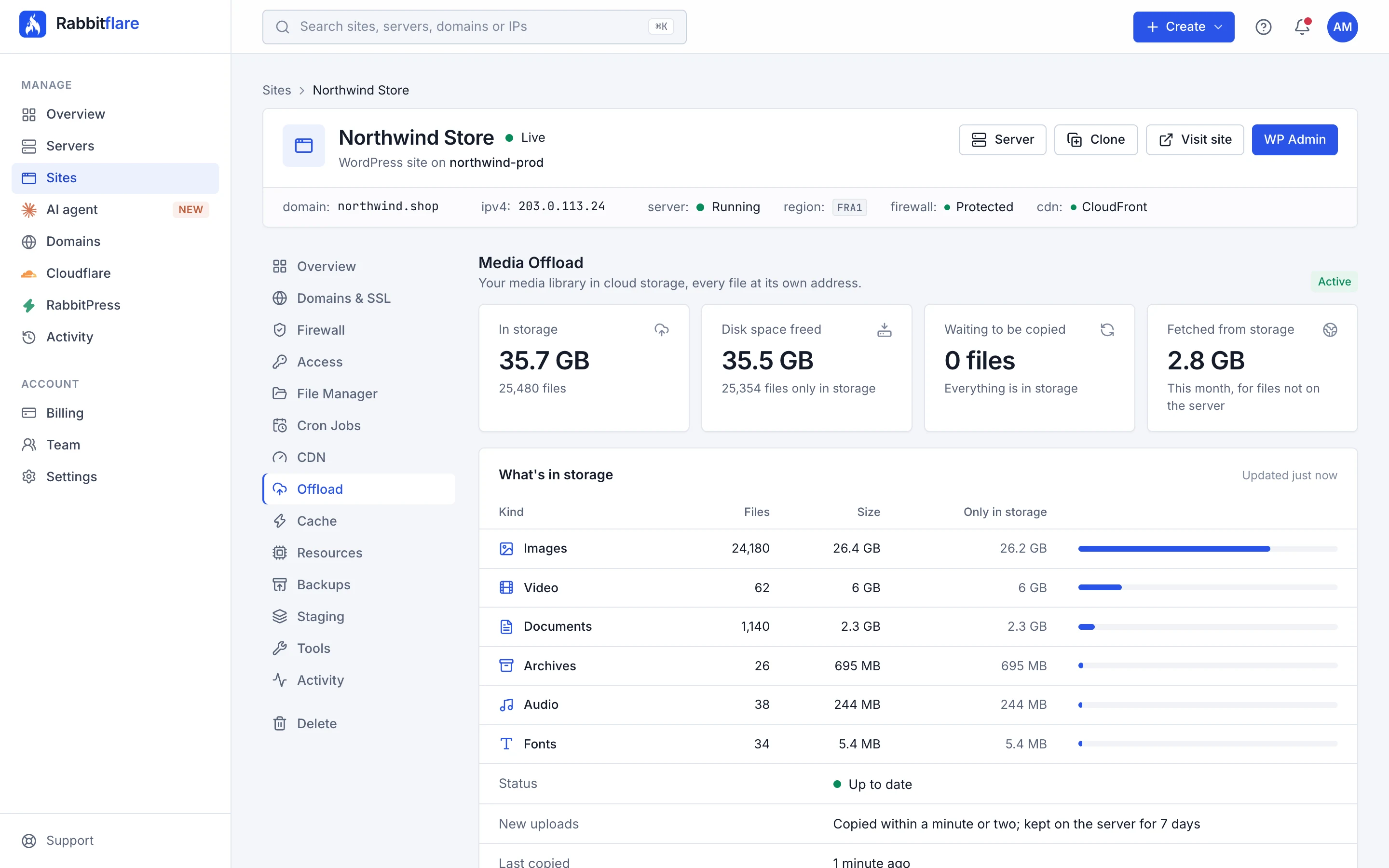
Photos, videos and PDFs pile up for years, and they're usually most of what fills a WordPress server. With Free up disk, older files live only in storage, so the server you already pay for has room for years more, and a bigger plan can wait.
- Choose how long new uploads stay on the server first: 1, 3, 7, 14, 30 or 90 days
- Or keep every file on the server too, with storage as a second copy
- Switch between the two whenever you like
northwind-prod · 80 GB disk
Example
- System and software
- WordPress and database
- Media on the server
- Free
35.5 GB freed on the server, and 64.3 GB of storage still included with it.
Getting started
Turn it on in one click.
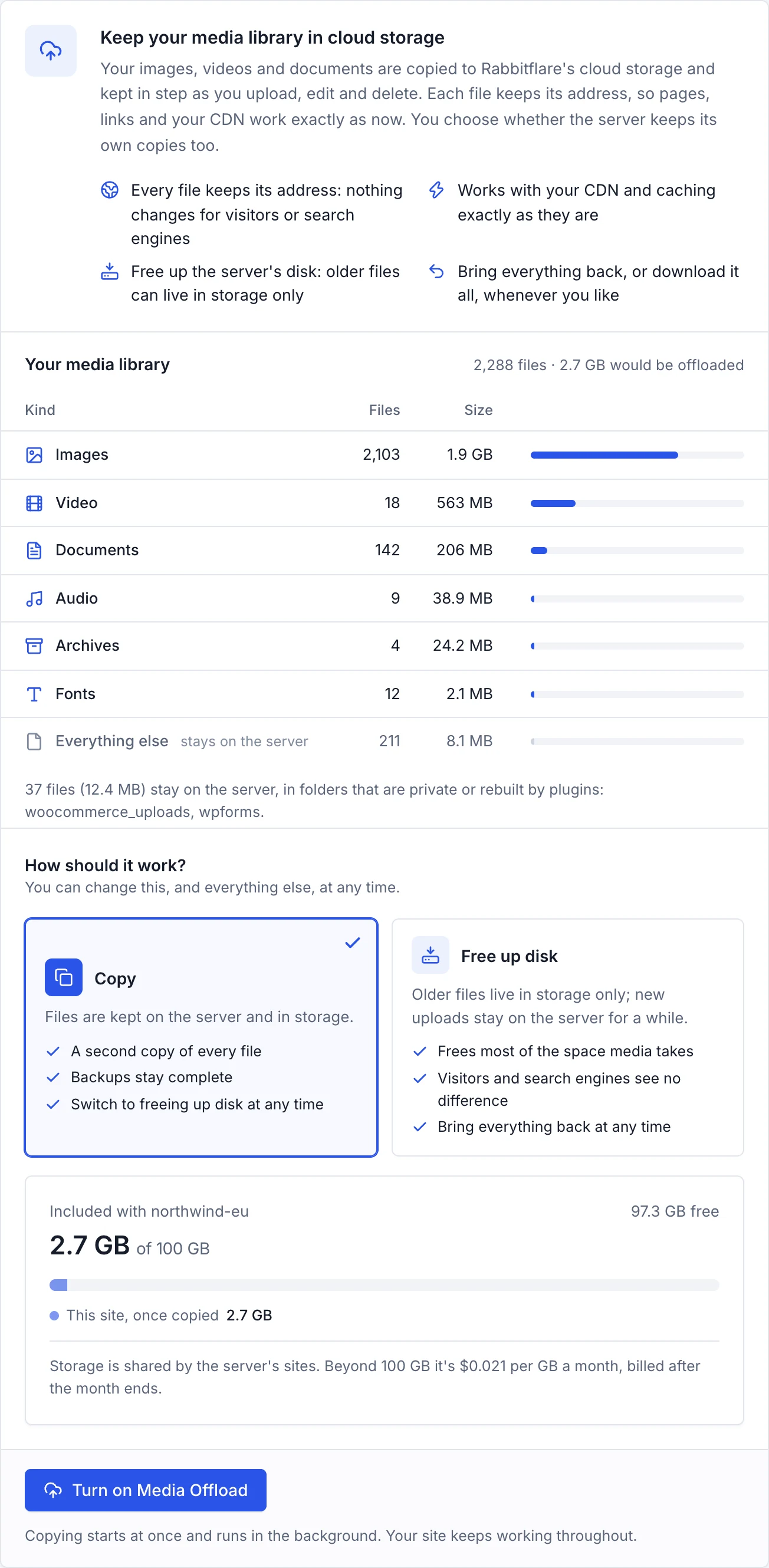
Open a site's Offload tab in the control panel. It reads your media library first, and shows what would move, what stays private on the server and how much of your included storage it would use. Choose a mode, and turn it on.
- A look at your library before anything moves
- Copy or Free up disk, and you can change your mind later
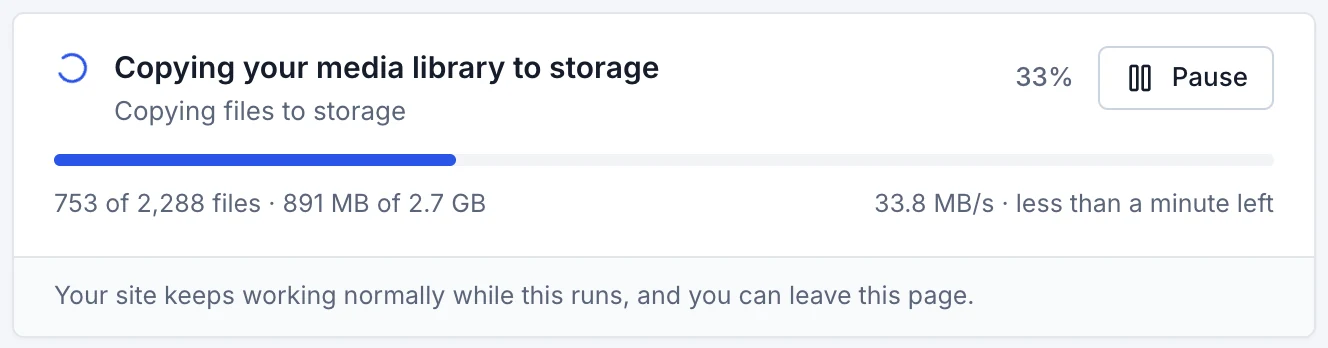
- Live progress with speed and time left, and a pause button
- Your site keeps working normally throughout
The first copy runs in the background.
Files are copied side by side and checked as they arrive, with live progress, speed and time left. Pause it whenever you like. Your site keeps working normally, and you can close the page.
Every day
Set it once. Every upload follows.
Media Offload works quietly in the background, every minute, for each site: new files are copied, deletions are mirrored, and older copies make room on the server. You don't have to lift a finger.
Delete a file in WordPress and its copy in storage goes too, recoverable for 30 days. Crop, rotate or regenerate an image, and its original comes back to the server first.
- 1
Upload as you always do
From WordPress's media library, a page builder, a form or a plugin. Nothing changes in how you or your team work.
- 2
Copied to storage within a minute or two
Each new file is copied as soon as it's complete, and checked against its SHA‑1 checksum on the way in.
- 3
Kept on the server for as long as you choose
In Free up disk mode, new uploads stay on the server for 1 to 90 days first, so image and SEO plugins can finish their work.
- 4
Then it lives in storage
The server's copy goes only once storage's copy is checked. Visitors get the file at the same address, as before.
- 5
Popular again? It comes back by itself
Files visitors keep asking for are brought back to the server, so they're sent straight from its disk again.
Full control
Every choice is yours.
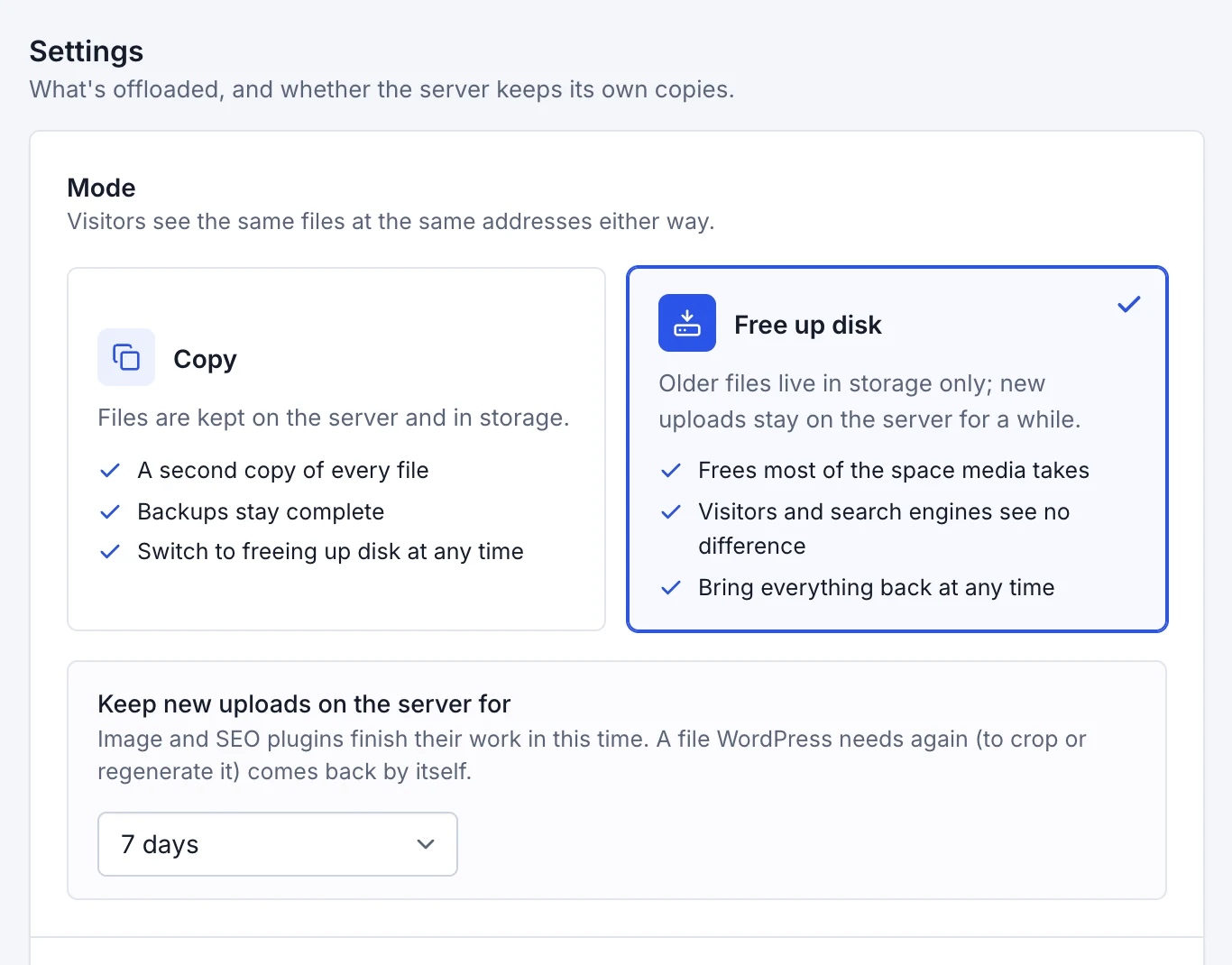
Decide, site by site, what's offloaded and what the server keeps. Change your mind whenever you like.
-
Copy or Free up disk
Copy keeps every file on the server and in storage: a second copy, and backups that stay complete. Free up disk lets older files live only in storage.
-
How long new uploads stay
1, 3, 7, 14, 30 or 90 days on the server before a new file leaves it, so image and SEO plugins can finish their work first.
-
Which kinds of files
Images, video, audio, documents, archives and fonts, each on or off. Other files plugins keep in the uploads folder can be included too.
-
Folders that stay put
Private downloads, form uploads, backups, logs, files plugins rebuild and code always stay on the server. Add any folder of your own.
Safe by design
Nothing leaves your server until it's proven safe.
Media Offload checks before it removes anything, keeps your media private, and keeps a way back for everything.
-
Checked byte for byte
Every file's SHA‑1 checksum is verified as it's stored, and checked again before the server's own copy is removed.
-
Tested before anything leaves
First, your server fetches a test file through your own site, the way a visitor would. If that doesn't work, nothing is removed.
-
30 days to undo
Files you delete or replace in WordPress stay recoverable in storage for 30 days.
-
A key for each site
Every site gets its own storage key. It reaches only that site's files, and it can't delete anything.
-
Private files stay private
WooCommerce downloads, form uploads, backups, logs and code are never offloaded. They stay on your server.
-
Private and encrypted
Storage itself is private and encrypted at rest. Your files are reached only through your own site.
No lock-in
Your files are always yours.
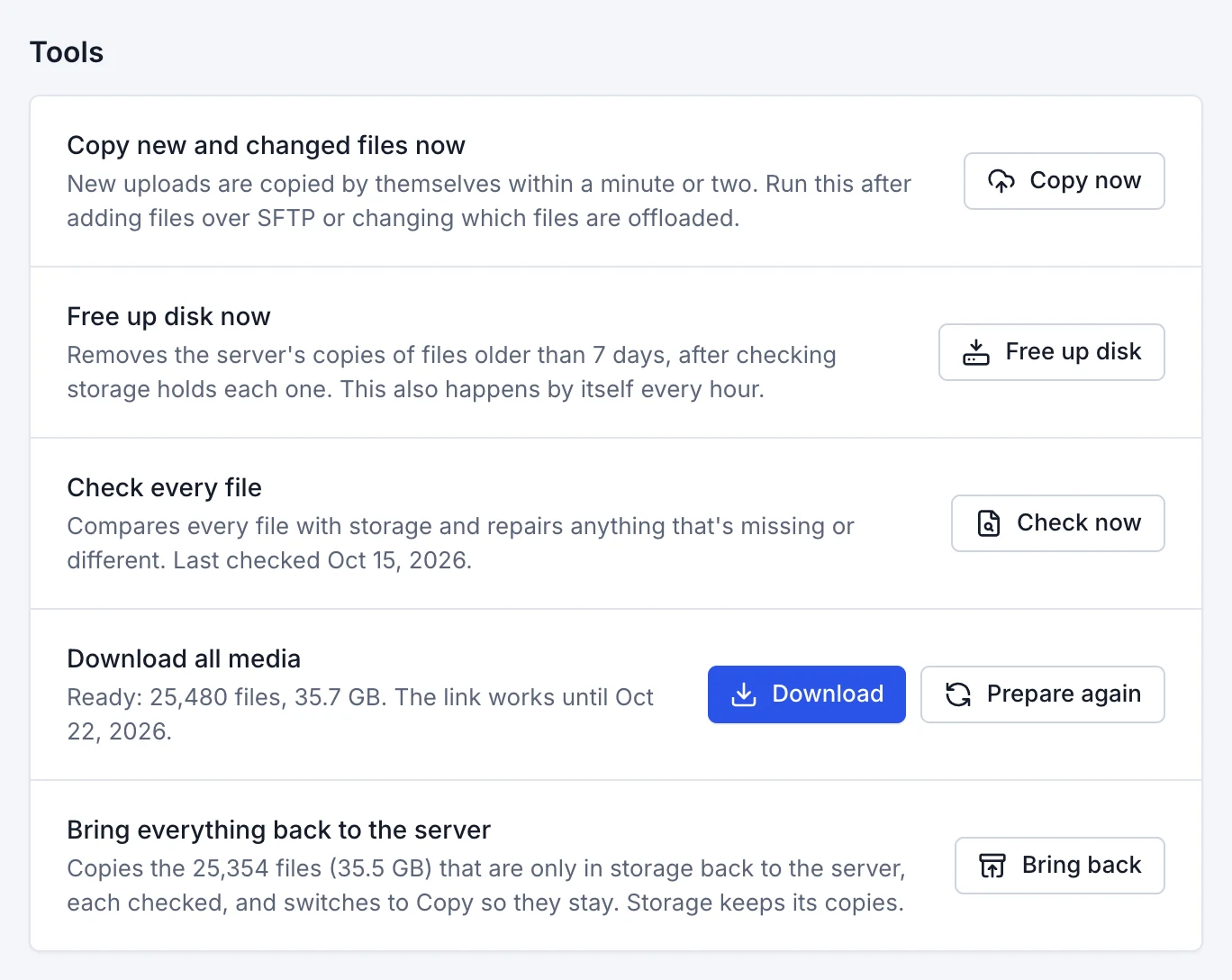
Every way out is one click away, in the same tab, and each runs in the background with live progress.
-
Download all media
Every file, on the server or only in storage, in one zip you download from your own site's address for 7 days.
-
Bring everything back
Each file is copied back to the server and checked, and the site switches to Copy so they stay there.
-
Check every file
Compares storage with the server, file by file, and repairs anything that's missing or different.
-
Turn it off
Everything comes back to the server first, which is then left exactly as it was. Storage keeps its copies for 7 more days.
Works with everything
Nothing else on your site has to change.
Because every file keeps its address, the rest of your site keeps working exactly as it does today.
-

Your CDN
Rabbitflare's free CDN keeps serving the same addresses. There's nothing to set up.
-

Image editing
Crop, rotate or regenerate thumbnails: the original comes back to the server first, checked.
-

WooCommerce
Product photos go to storage. Private downloads stay on the server.
-

Themes and page builders
No URL rewriting, so builders, themes and SEO plugins keep the same links.
-

Cloudflare
In front of your site? The links are the same, so it simply keeps working.
-
Staging
Staging copies show the live site's media straight from storage, read-only.
-
Cloning
A clone takes its media along: files that live only in storage are copied inside storage.
-
Any file name
Accents, spaces and other alphabets, like café‑menü.jpg or 日本語.png, are handled like any other name.
Built in
Everything an offload plugin asks of you, already done.
Offload plugins need a storage account, keys, settings and a second bill, and they move your images to new addresses. Media Offload is part of your server, so none of that is yours to do.
-
An offload plugin and its licence
Not needed: it's part of your server
-
A cloud storage account and its bill
100 GB included with every server
-
Buckets, access keys and permissions
Set up for each site, automatically
-
New addresses for every image
Not needed: every address stays
-
Fees for downloads
None: downloads are always free
-
Moving your existing library by hand
Copied for you, with live progress
Turned on per site, in one click.
Pricing
100 GB included with every server.
Storage is shared by the server's sites. Beyond 100 GB, it's $0.021 per GB a month. Downloads are always free.
With every cloud server
Included100 GB per server
Turn Media Offload on for any site on a Rabbitflare cloud server, at no extra cost up to 100 GB.
- 100 GB of storage per server, shared by its sites
- Every feature, on every site
- Downloads by your visitors are always free
- Beyond 100 GB: $0.021 per GB a month, billed after the month
- DigitalOcean, Vultr, Hetzner and Rabbitflare Edge servers
- Included with the server
- 100 GB
- Beyond that, at $0.021 per GB a month
- 50 GB
- Downloads by your visitors
- Free
A month
$1.04
Charged after the month ends, for what was actually stored.
Storage is measured every day and charged after the month ends, from your wallet first and then your card. Media Offload isn't available on servers you connect yourself, or during the free trial.
Will my image addresses change?
No. Every file keeps its address, and nothing in your database, pages or theme is rewritten. When a file isn't on the server any more, your server fetches it from storage and sends it on, from the same address.
Is it as fast as before?
Files on the server are sent exactly as before. A file that lives only in storage is fetched by your server, which keeps a copy for a week, so the next visitors get it straight from there. Files visitors keep asking for come back to the server by themselves, and with the CDN on, most visitors get files from an edge location near them anyway.
What happens to new uploads?
They're copied to storage within a minute or two. In Free up disk mode they also stay on the server for the days you choose (1, 3, 7, 14, 30 or 90), so image and SEO plugins can finish their work, and then leave it.
Can I still edit images and regenerate thumbnails?
Yes. When WordPress needs an original that's only in storage, to crop, rotate or regenerate it, the original is brought back to the server first and checked against its SHA‑1. New uploads never take the name of a file that's only in storage.
What about backups?
Files kept only in storage aren't in your server's backups, but they're safe in storage, with 30 days of history for anything changed or deleted, and they stay in place when you restore a backup. In Copy mode the server keeps every file too, so backups stay complete.
How do I stop using it?
Choose Turn off in the site's Offload tab. Every file is brought back to the server first, each one checked, and then your server is left exactly as it was. Storage keeps its copies for 7 more days. You can also download your whole media library as one zip at any time.
How much does it cost?
Each Rabbitflare cloud server includes 100 GB, shared by its sites. Beyond that, it's $0.021 per GB a month: storage is measured every day, and the total is charged after the month ends, from your wallet first and then your card. Downloads by your visitors are always free.
Which servers can use it?
Every server bought through Rabbitflare, on DigitalOcean, Vultr, Hetzner or Rabbitflare Edge. It isn't available on servers you connected to Rabbitflare yourself, or on free-trial servers.
Is my media safe and private?
Each file is checked as it's stored, and a server's copy is removed only once storage holds the very same file and a test fetch through your site works. Storage is private and encrypted, each site's key reaches only its own files and can't delete anything, and deleted or replaced files can be recovered for 30 days.
I already use an offload plugin. Can I switch?
Yes. If that plugin removed files from your server, use its own tools to bring them back first, then switch it off: Media Offload waits while another offload plugin is active, so the two never handle the same files.
Do I need to install anything?
No. Media Offload runs on your server and adds a small helper to WordPress for you, which keeps WordPress in step with storage: deletions, image editing and new file names. There's nothing to set up in WordPress.
Give your server room to grow.
100 GB of media storage comes with every Rabbitflare cloud server. Turn it on for a site in one click, and off again just as easily.