
Business email on your domain,
from $0.99 a mailbox.
Mailboxes at [email protected] with a webmail people enjoy, every mail app, two-factor sign-in and the DNS set up for you. Every feature is on every package.
- $0.99 per mailbox a month
- Every feature on every package
- 15–120 GB
- Works with every mail app
Works with the apps you already use
- Apple Mail
- Outlook
- Gmail app
- Thunderbird
- Samsung Email
- per mailbox a month, with every feature on every package
- $0.99
- per message you send, and 50 MB for messages you receive
- 25 MB
- people per message, because mailboxes are for people writing to people
- 50
- to change your mind, with what you paid credited to your wallet
- 30 days
Your domain
Set up for you.
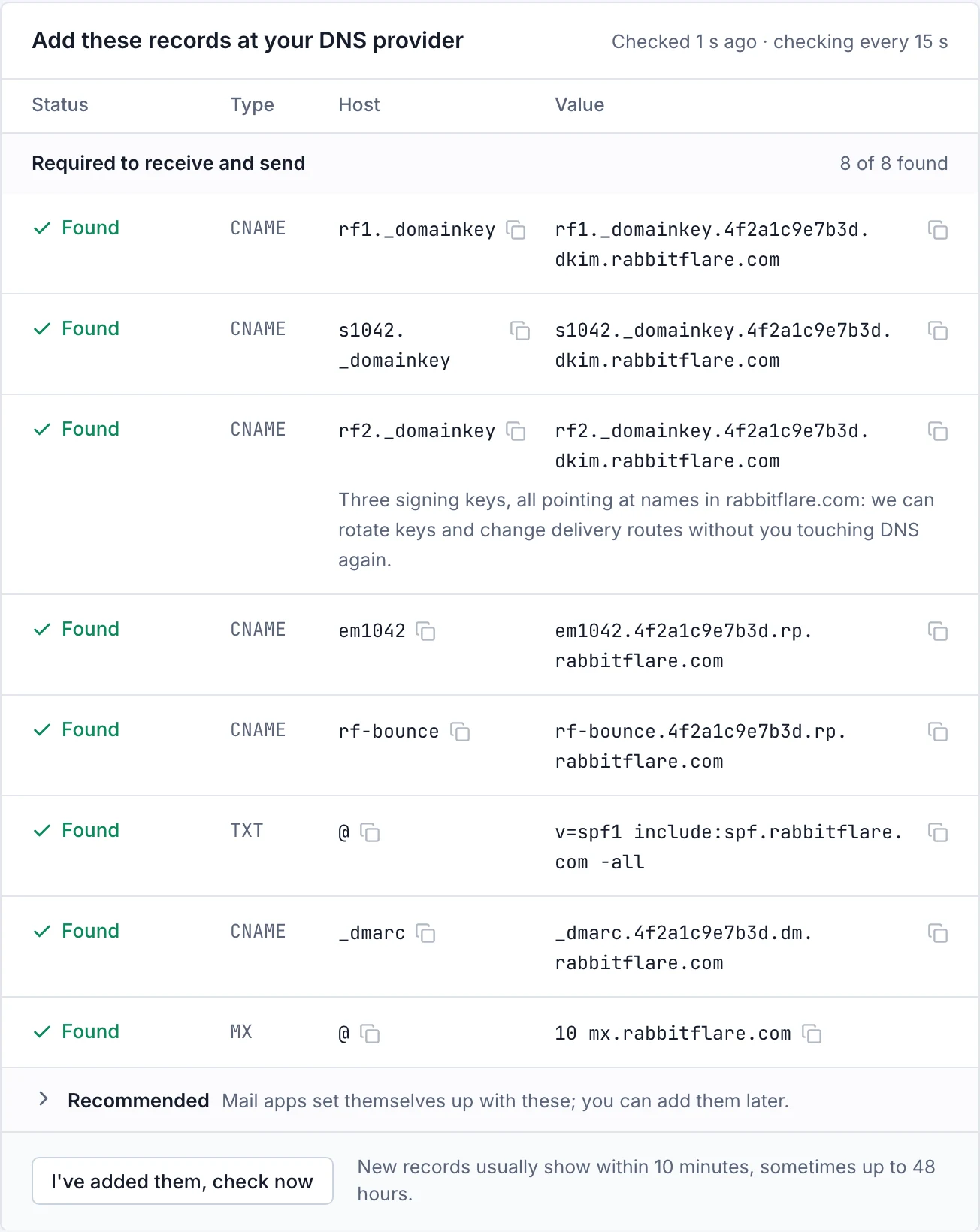
Add your domain in the control panel. If it's registered with us or connected through Cloudflare, its records are written for you. If it's anywhere else, you get the exact records for your provider, with a live check on each one.
- Registered with us or connected through Cloudflare: your records are written for you
- Anywhere else: the exact records, with a live check on each one
- Signing, sender checks and encrypted delivery are all included
- New records usually show within ten minutes
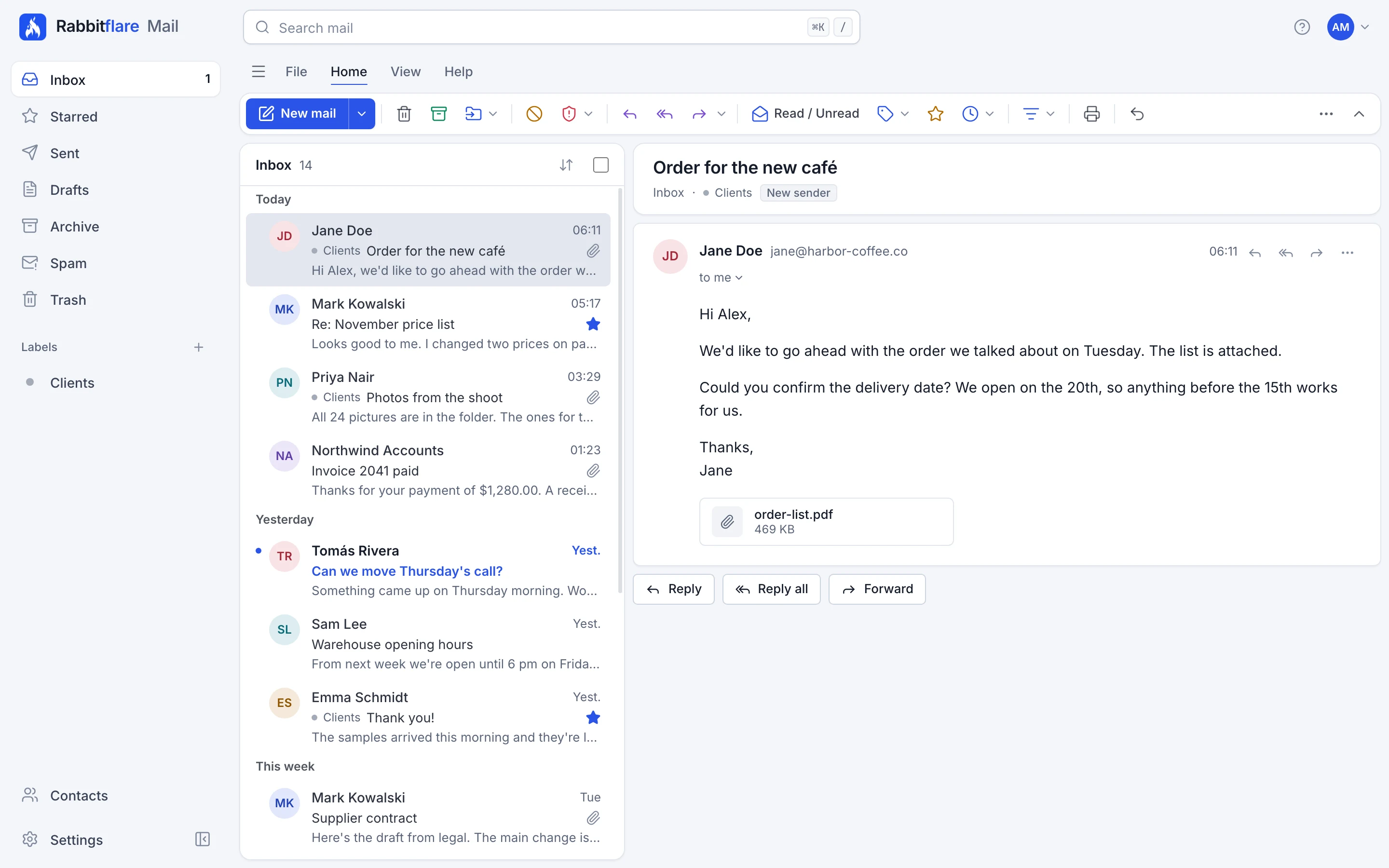
The webmail
A mailbox people enjoy.
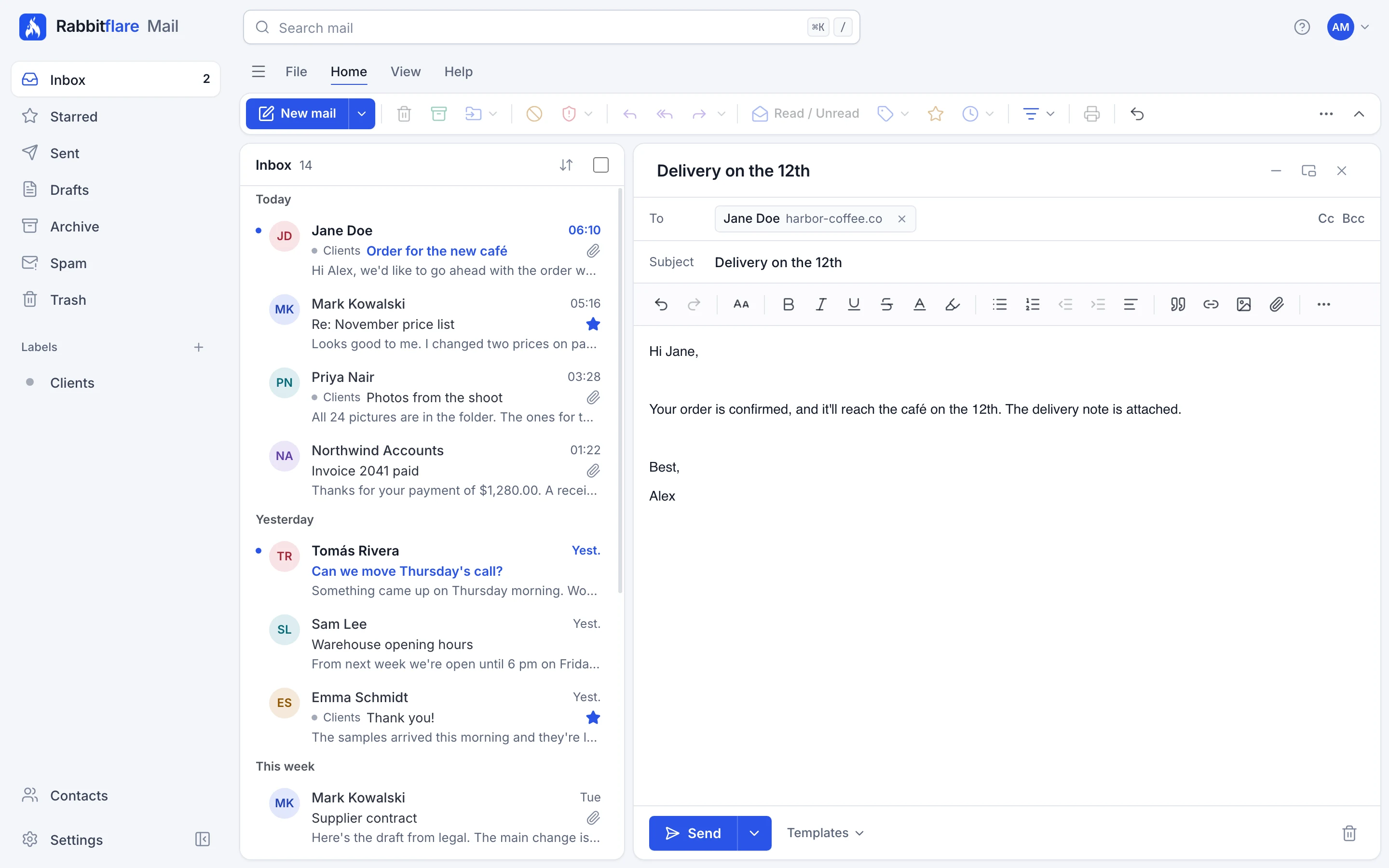
Quick to open, easy to read, and there on every device, in light or dark.
-
Keyboard first
⌘K or / to search, j and k to move, and the Gmail shortcuts you may already know. Press ? to see them all.
-
Undo send
Changed your mind? Take a message back in the seconds after you send it.
-
Send later
Write it now and choose when it goes.
-
Snooze and reminders
Put a conversation away until you need it, or get reminded if nobody replied.
-
Rules
Rules that read like sentences, for sorting mail as it comes in.
-
Search
Fast search across your mail, with operators when you want them.
-
Contacts
Contacts and groups, which sync to your phone and mail apps.
-
Dark mode
A proper dark theme, and it can darken messages that support it.
-
Works offline
Read what you've opened without a connection. What you write is kept on your device until you're back.
-
Bring your mail
Import from Gmail, Yahoo, iCloud, Zoho, cPanel or any other IMAP server.
Your team
Every mailbox in one place.
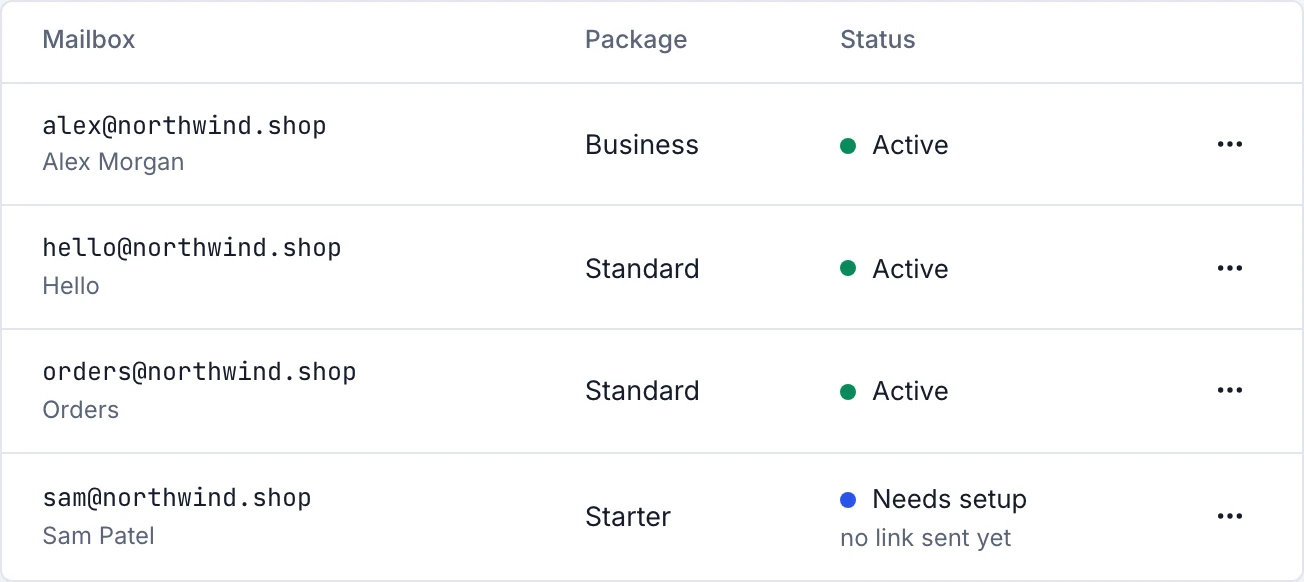
Create mailboxes one at a time or from a list, send each person a setup link, and manage aliases and groups from the control panel you already use.
- Each person sets their own password from their setup link
- Aliases and groups between your own mailboxes
- Change a mailbox's package whenever you like
- Export any mailbox: mail, contacts and calendars
Protection
Protection built in.
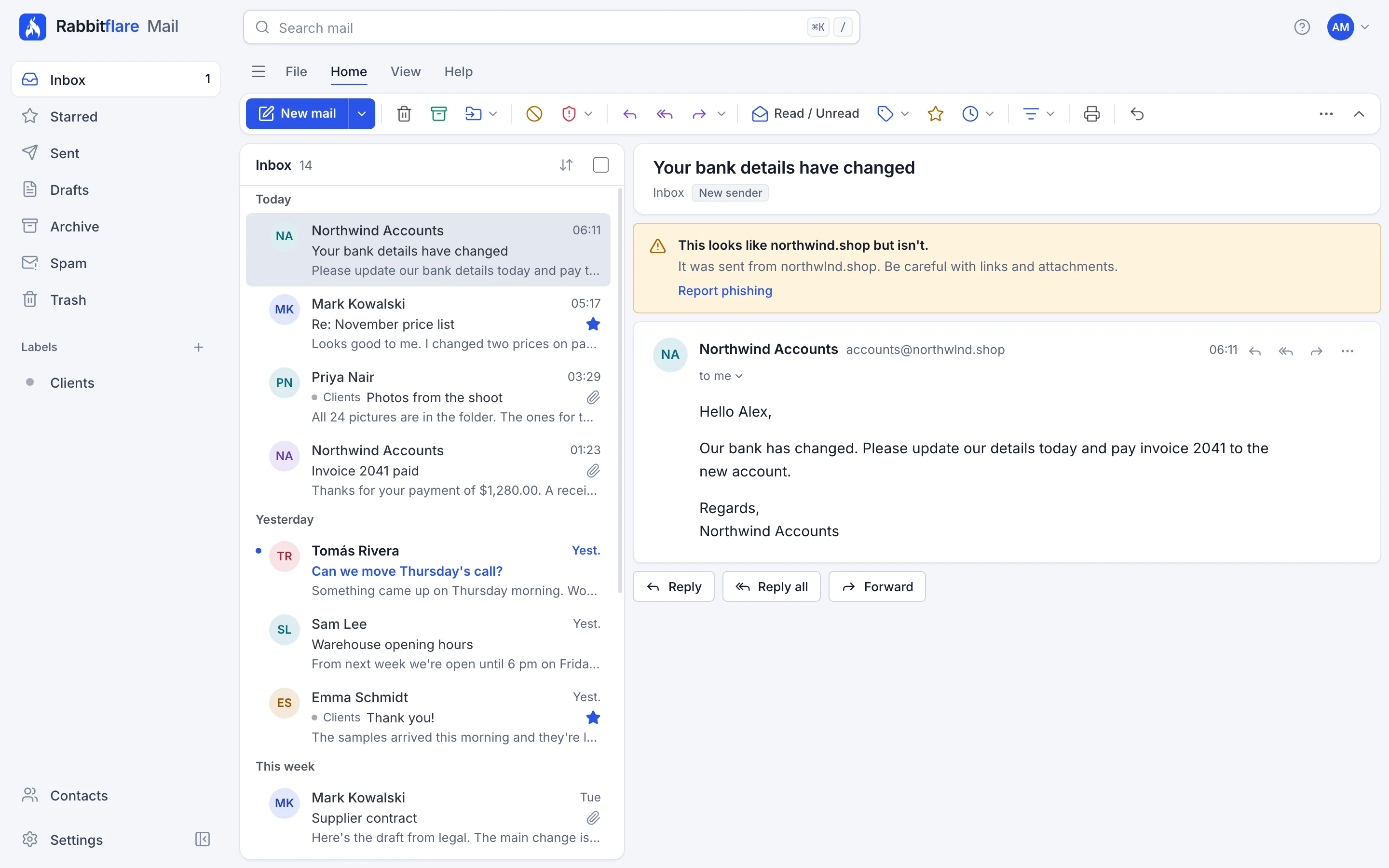
Business email is how most break-ins begin. So the checks are on from the first day, and when something's wrong, the webmail says what and why.
-
Scanned in and out
Every message is checked for spam, phishing and malware, whichever way it's going.
-
Two-factor sign-in
On by default for every new domain, with 7 days to set it up, using the authenticator app people already have.
-
Passkeys
Sign in with a fingerprint, a face or a security key instead of typing a password.
-
A password per device
Each phone or mail app gets its own app password. Lose a device, and you end just that one.
-
Warnings that say why
Lookalike senders, display names that don't match, and messages that fail their checks are named, with what was really sent.
-
Pictures wait, links tell
Remote pictures are held back until you choose, and a link shows where it really goes before you click.
-
Sessions and history
See what's signed in and where from, and sign anything out.
-
No tracking, ever
No ads, no analytics and no tracking pixels in the webmail. Trackers in the mail you receive are removed.
Your mail lives in the European Union, on servers we run in Finland. The index, metadata and backups are encrypted, and message bodies sit in a private storage bucket in the EU.
Sending
For people, not newsletters.
Starter includes about 10 messages a day to people outside your company (300 recipients a month, pooled across your domain), and 1 GB of attachments to them. Mail within your domain and everything you receive doesn't count.
At the limit, a message is refused as a whole with a plain explanation, nothing is half-sent, and incoming mail is never affected. Rabbitflare Mail is for people writing to people. Newsletters and bulk mail need a bulk service.
Pricing
From $0.99 a mailbox.
Mix packages on the same domain. Every feature is on every package.
Starter
A personal address or a shared info@ box.
$0.99 a mailbox a month
- 15 GB of storage
- 300 recipients outside your domain a month (about 10 a day)
- 1 GB of attachments to them a month
Standard
Everyday business mail with room to grow.
$1.99 a mailbox a month
- 30 GB of storage
- 600 recipients outside your domain a month (about 20 a day)
- 2 GB of attachments to them a month
Business
Busy inboxes, big attachments, lots of history.
$3.99 a mailbox a month
- 60 GB of storage
- 1,200 recipients outside your domain a month (about 40 a day)
- 4 GB of attachments to them a month
Pro
Power users and sales teams.
$7.99 a mailbox a month
- 120 GB of storage
- 2,500 recipients outside your domain a month (about 83 a day)
- 8 GB of attachments to them a month
Your first Mail payment is $10 (or your mailboxes' first month, if that's more). Anything left stays in your wallet and pays the following months. Pay by card or from your wallet.
Everything below is in every package.
- The webmail
- Every mail app: IMAP, SMTP and automatic setup
- Calendar and contacts sync to your devices
- Two-factor sign-in and passkeys
- App passwords per device
- Rules and vacation replies
- Snooze, send later and undo send
- Search with operators
- Contacts
- Import from Gmail, Yahoo, iCloud, Zoho, cPanel and any other IMAP server
- Security warnings and link previews
- Aliases and groups
- DNS set up for you, with live checks
- Domain health: SPF, DKIM, DMARC, MTA-STS and TLS reports
- Held-message and blocked-address controls
- Team permissions
- 30 days to change your mind, as wallet credit
- Support from the control panel
Need more? Add 1,000 recipients a month, with 1 GB of attachments, for $1.99 per domain, and 10 GB of storage for $0.99 per mailbox.
Questions
Good to know.
Getting started 5
Can I keep Google Workspace or Microsoft 365 for some people on the same domain?
No: a domain receives mail in one place. Use a subdomain or a second domain for the others, or move everyone with the import tool.
Do I need to host my website with Rabbitflare?
No. You need a Rabbitflare account and a domain you control. Your website can stay anywhere.
Can I import my old mail?
Yes: from Gmail and Google Workspace, Yahoo, iCloud, Zoho, cPanel and any other IMAP server, by each person from the webmail, or by an administrator for the whole team from the control panel. Run it again until the day you switch. Outlook.com and Microsoft 365 can't be imported yet: Microsoft needs its own sign-in, which comes in a later version.
Is there a trial?
No. Mailboxes start at $0.99 a month, with a first payment of at least $10, and what your mailboxes don't use yet stays in your wallet. If you change your mind within 30 days, what you paid is credited to your wallet.
How soon can I send?
Receiving mail and mail between your own mailboxes work as soon as your domain's records are in place. A person looks at each new account before it can write to anyone outside, usually within one business day; until then, what you send waits for that check. After that, your first 10 outside messages each get a quick check too. If you've paid us for a server for more than 30 days, you skip the first step.
Everyday use 4
Can I forward my mail to Gmail?
Not yet. Automatic forwarding to addresses outside Rabbitflare Mail isn't offered in this first version, because it breaks the sender checks big providers rely on. Aliases and groups between your own mailboxes, the Forward button, and every mail app on your phone all work.
Which apps work, and will my iPhone get mail instantly?
Apple Mail, Outlook, the Gmail app, Thunderbird and Samsung Email set themselves up with an app password. iPhone's Mail app checks for new mail every 15 minutes. For instant notifications, add the webmail to your home screen.
Can I send newsletters or campaigns?
No. Rabbitflare Mail is for people writing to people. Our anti-spam policy explains what is and isn't allowed, and where bulk mail belongs.
Is there a calendar?
Your calendar and contacts sync to your phone and mail apps. The webmail shows your contacts.
Billing and privacy 3
What happens when I reach the allowance?
The message is refused with a plain explanation, and nothing is half-sent. Incoming mail is never affected. Add more sending from the control panel, or wait for the 1st of the month.
How do I pay?
By card or from your Rabbitflare wallet, with one invoice a month for all your mailboxes. If you haven't paid us for anything yet, you start by adding $10 to your wallet. PayPal isn't available for mailboxes.
Where is my mail stored, and who can read it?
In the European Union: on servers we run in Finland, with message bodies in a private storage bucket in the EU. Nobody at Rabbitflare reads your mail. Support can look into a mailbox only with your written permission, for a limited time, and you're told when it happens. Messages our filters hold for review may be read to decide them.
The guides
Create your first mailbox.
Add your domain, choose a package, and send your team their setup links, from the control panel.