Skip to content
Rabbit Shield · included with every cloud server

Seven layers of protection around every site.

Cloudflare in front of your server. A firewall in front of WordPress. A malware scan every night, and Claude for the clean-up. All seven are built into every Rabbitflare cloud server.

  • Nothing to install
  • No plugin to buy
  • Undo any clean-up for 30 days

Layers 01–03

On the way in. Three layers stand between the internet and WordPress.

01 Cloudflare Pro At the edge

Attacks are stopped before they reach your server.

Your visitors reach your site through Cloudflare first. Its network absorbs floods of requests, its managed rules and browser check turn away attack tools and bad bots, and addresses we've seen attacking other sites are kept out of yours. You don't need a Cloudflare account: your domains go through ours.

DDoS protection
Floods are absorbed, whatever their size
Leaked passwords
A new one is asked for at sign-in
No way round it
Your server refuses visitors who skip Cloudflare

How Cloudflare protection works
02 ModSecurity On your server

Every site has a firewall of its own.

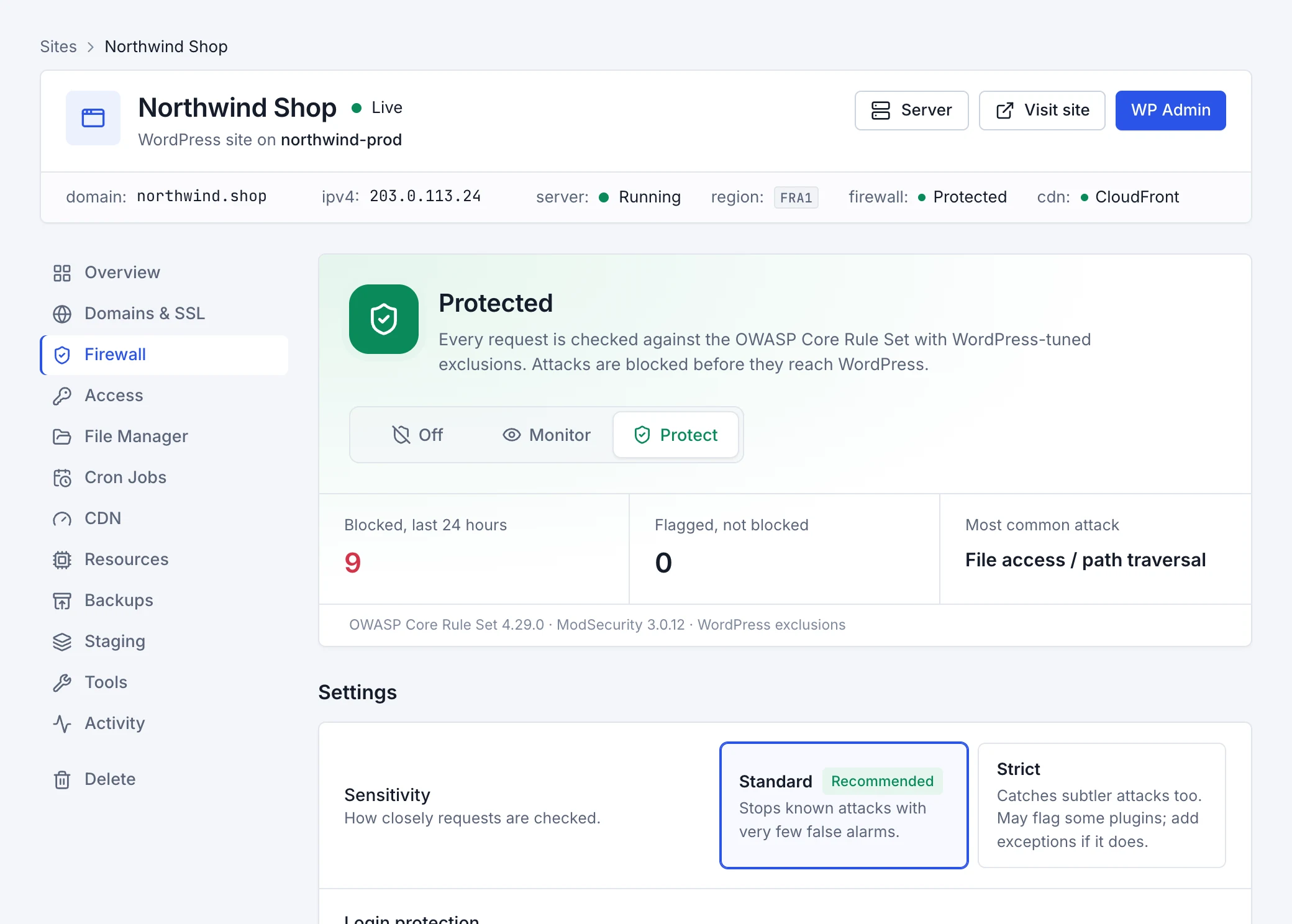
Whatever gets past the edge meets ModSecurity, the open-source web application firewall, inside your server. It reads every request before WordPress runs it, so an attack is refused before a single plugin sees it. Each site has its own, with its own mode and its own exceptions.

Modes
Protect, Monitor or Off, for each site
New sites
Start protected
Beside it
Login protection slows password guessing
How the firewall works
03 OWASP Core Rule Set The rules

It knows the attacks the world already knows.

The firewall's rules are the OWASP Core Rule Set, the open rule set that security teams around the world rely on, tuned for WordPress so the editor, uploads and plugins keep working. SQL injection, cross-site scripting, file and code injection, known exploits and hacking tools are recognised and refused.

Sensitivity
Standard, or Strict
Every attack
Listed with its page, its address and the rule
A false alarm
“This was me” allows it, from the event's own menu
About security events

Layers 04–06

Around the clock. Three more watch what's already on your site.

04 Wordfence Intelligence Known holes

You hear about a hole before anyone uses it.

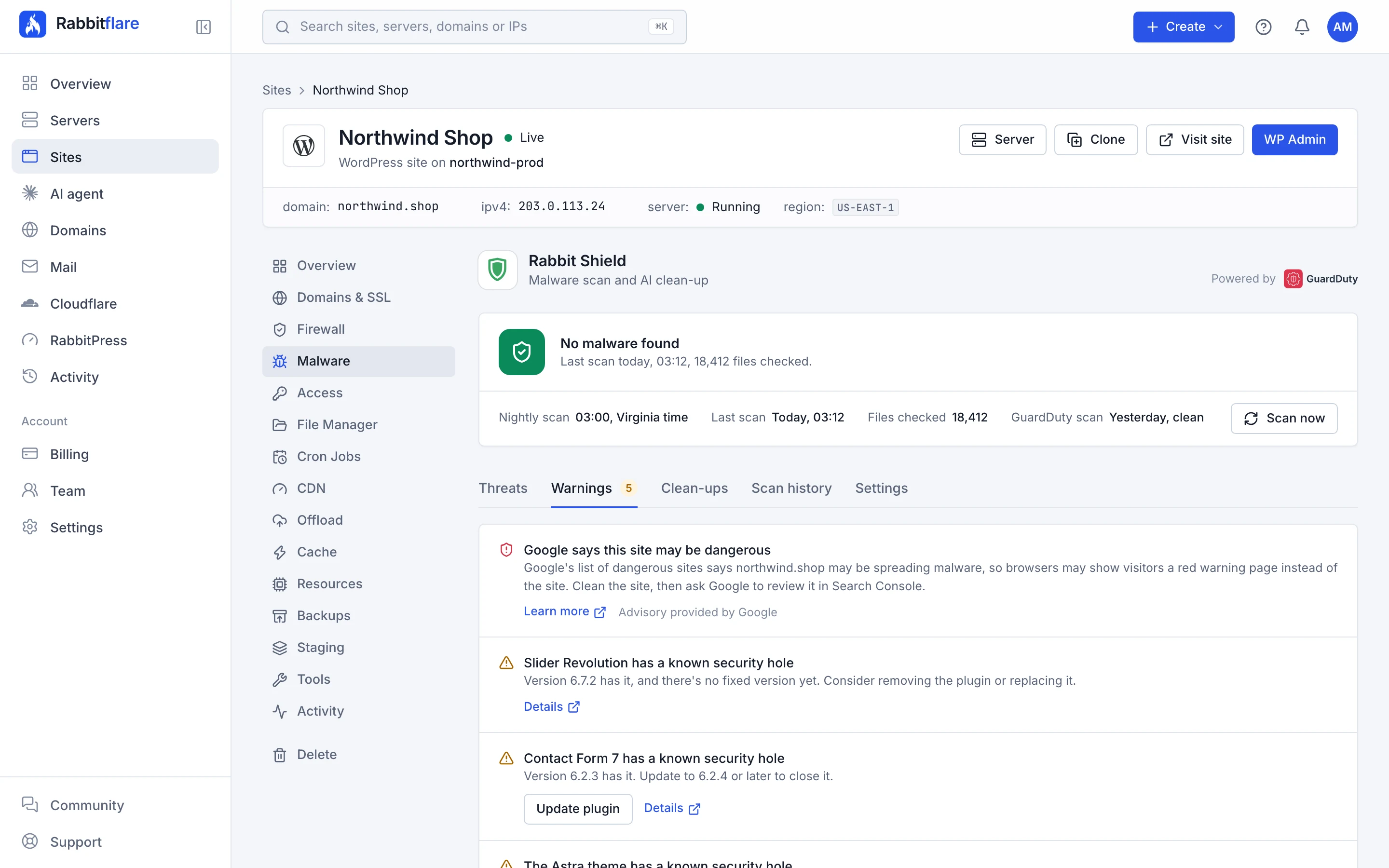
Most sites are broken into through a plugin with a known security hole. Each site's plugins, themes and WordPress version are checked against Wordfence's vulnerability list after every scan and every day. A warning names the hole and what closes it, usually an update.

Checked
After each scan, and every day
Covers
Plugins, themes and WordPress itself
Each warning
The version that closes it, and a button to update
About warnings
05 Google Web Risk Reputation

You know before browsers show a red warning.

Google keeps the list of dangerous sites that browsers use for their red warning page. Each of your sites is checked against it after every scan and every day, so if yours is ever listed, you hear it from us first, not from a customer.

Checked
After each scan, and every day
The list
Google's own list of dangerous sites
If you're listed
A warning, with what to do next
About warnings
06 ImunifyAV, Amazon GuardDuty or ClamAV Malware scan

Every site is scanned, every night.

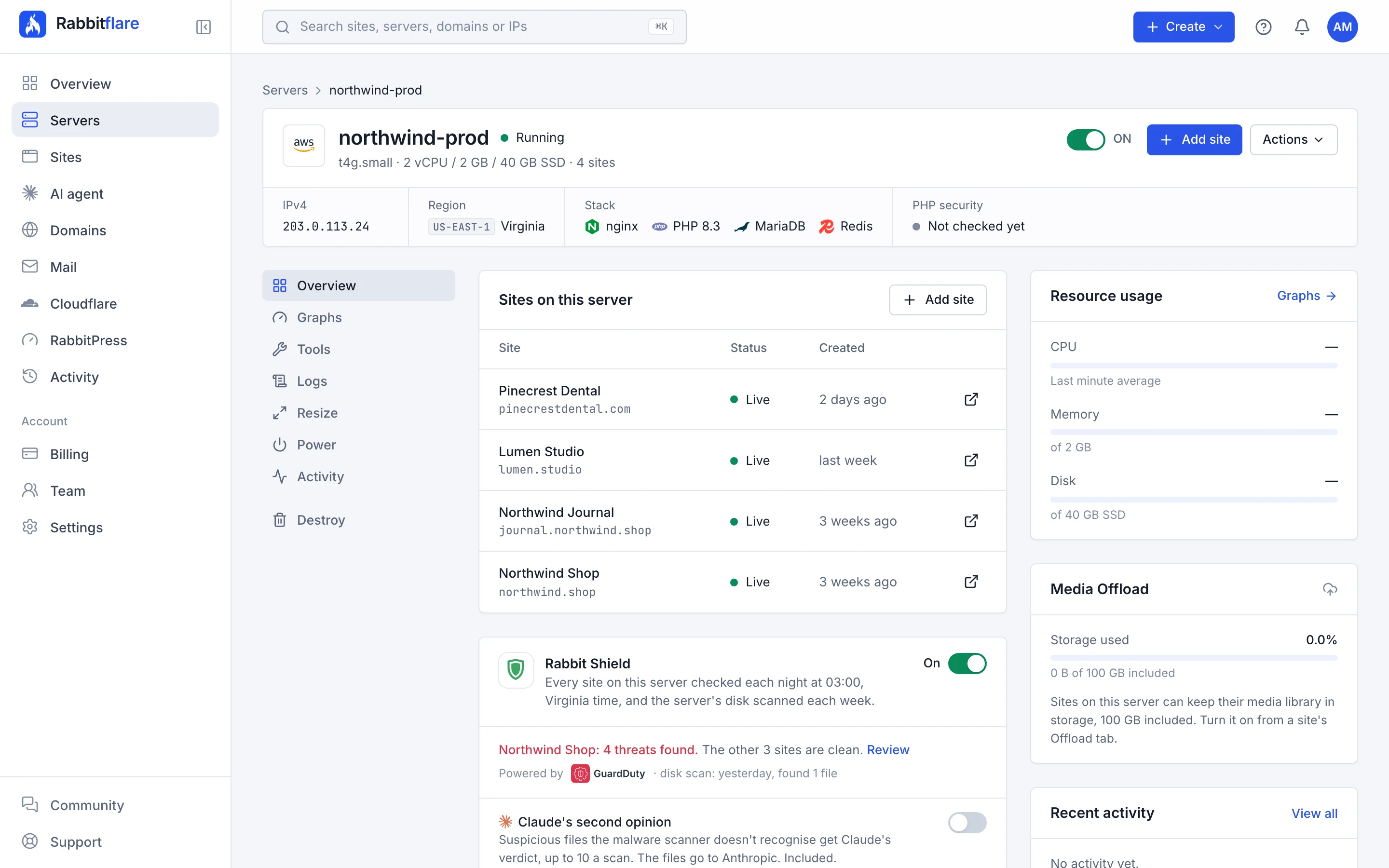
At 03:00 in your server's own time, an antivirus engine reads every file against a malware list that's kept up to date: ImunifyAV, or ClamAV on Arm servers. On Amazon EC2, Amazon GuardDuty scans a copy of the server's disk every week. And every night, on every server, WordPress's files are compared with their official copies, and our own checks look for what scanners miss.

Nightly scan
03:00, your server's time
Gentle
One site at a time, at the lowest priority
Staging copies
Scanned too
How scans work

Layer 07

If something gets in. And one takes on the clean-up.

07 Claude AI clean-up

The hard cases go to Claude.

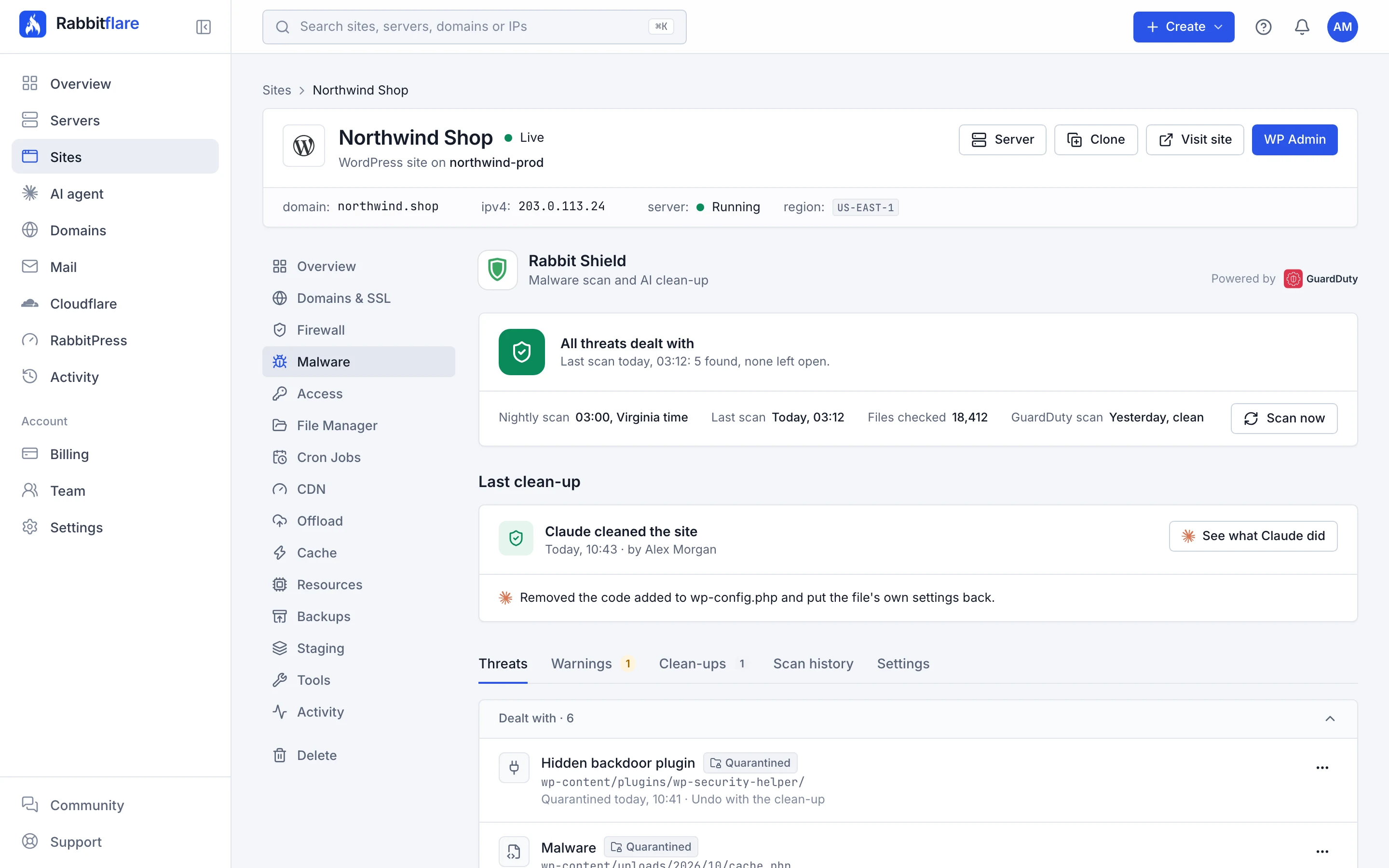
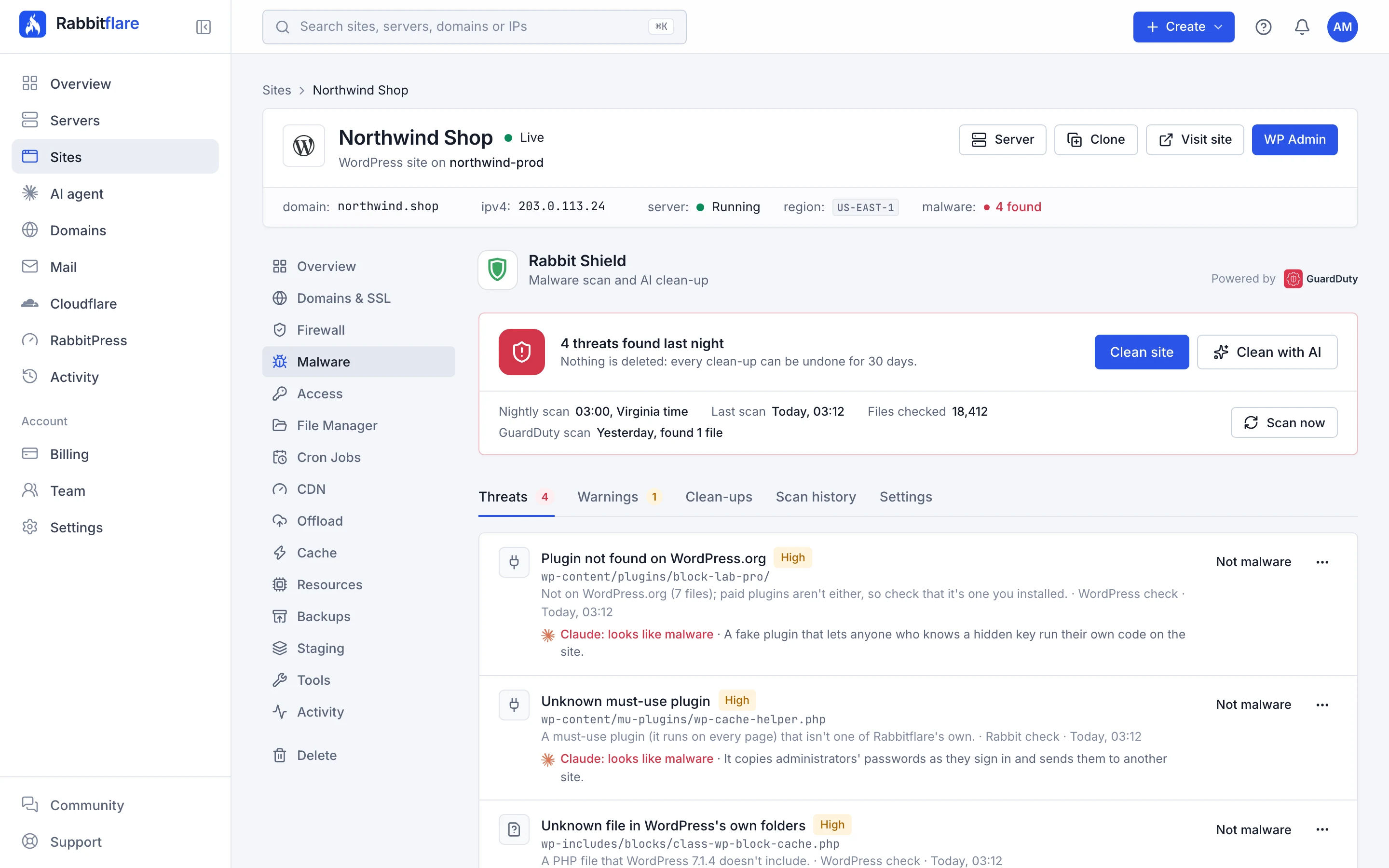
Some malware hides inside a file your site needs, like wp-config.php, where removing the file would break the site. One click hands it to Claude, Anthropic's AI, which takes out what was added and checks that the site still works. Claude can also give a second opinion on files that are only suspicious.

Included
1 AI clean-up per site each month
First
A restore point is saved
If Claude can't finish
Our team takes over
About Clean with AI

Add-on

On its way. An eighth layer, for those who want it.

+ Patchstack Add-on · coming soon

Next: holes patched before the update arrives.

Patchstack protects WordPress sites from known holes in plugins, themes and WordPress itself with virtual patches: small rules that block the attack on a hole until its update is installed. It's coming to Rabbitflare cloud servers as an optional add-on.

What it adds
Virtual patches for known holes
How you'll get it
An optional add-on
When
Coming soon

When something is found

One click cleans the site. Thirty days to undo it.

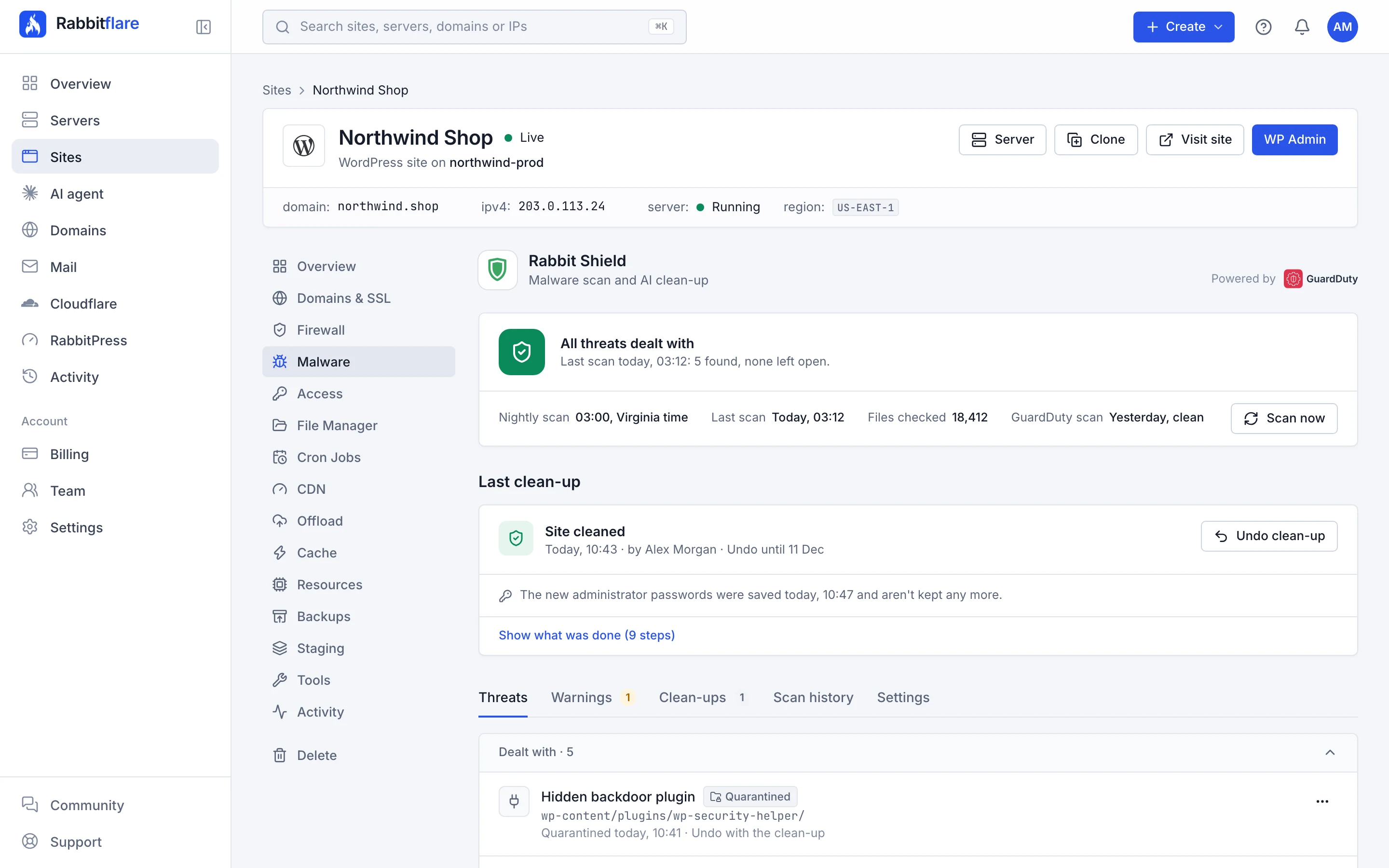
Clean site deals with everything the scan found, step by step, then checks that the site still works. Nothing is deleted: what was found waits in quarantine, and one button puts everything back as it was.

  • A restore point is saved before anything changes.
  • A file that matches WordPress.org's official copy is never moved.
  • New keys and passwords, because whoever got in may know the old ones.
  • If the site doesn't answer normally afterwards, the clean-up undoes itself.
How a clean-up works
Layers
7
Scans
Every night
Undo
30 days
Extra cost
$0

In your control panel

And this is the real thing.

Two tabs on every site. Firewall, for what's stopped on the way in. Malware, for what was found, what was done about it and the warnings worth acting on.

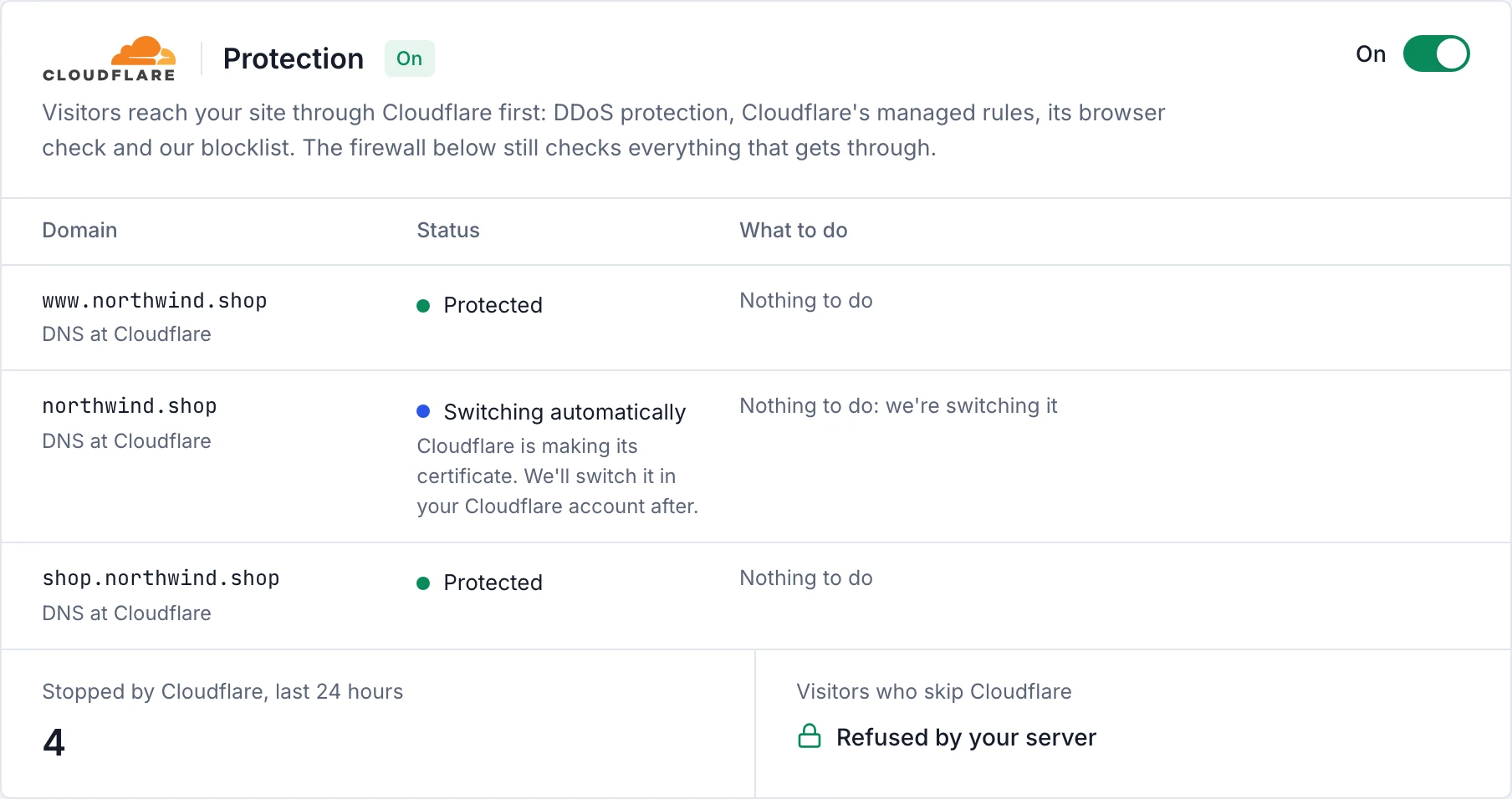
The Cloudflare protection card: on, www and shop Protected, and the root domain Switching automatically in the customer's Cloudflare account, with 4 requests stopped by Cloudflare in the last 24 hours and visitors who skip Cloudflare refused by the server.
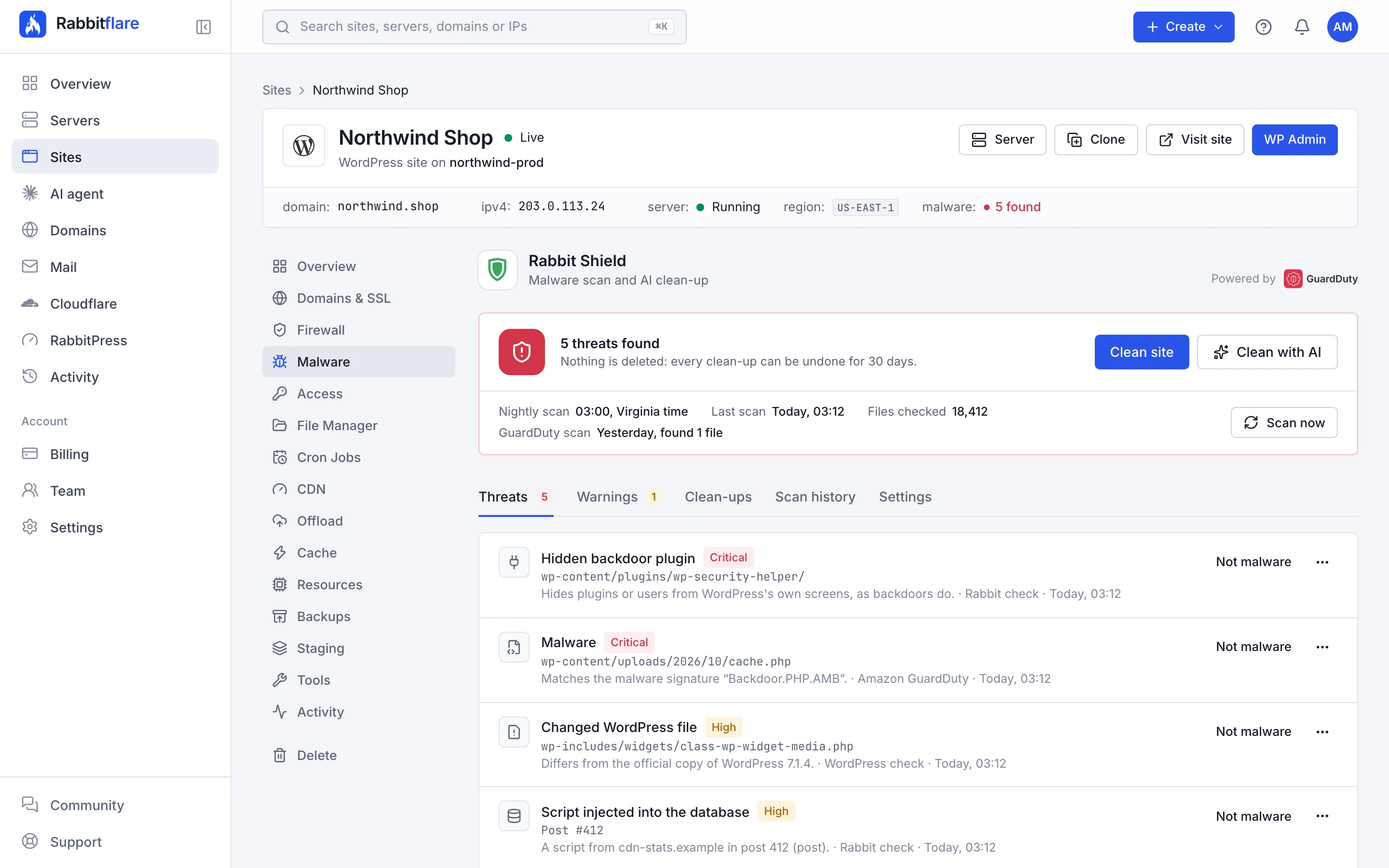
One switch puts Cloudflare in front of the site

Turn it on at the top of a site's Firewall tab, and its domains go through Cloudflare. The card shows where each domain stands and what Cloudflare stopped in the last 24 hours. Domains bought here, or in a Cloudflare account you've connected, are switched for you.

  • No Cloudflare account needed
  • Nothing goes offline while a domain is switched
  • Every stopped request listed, with why

Included

All seven come with the server.

No plugin to buy and no fee per site. Every layer is part of every Rabbitflare cloud server, whatever its size.

With every server Rabbitflare creates for you

  • Cloudflare protection for your domains
  • A web application firewall for every site
  • The OWASP Core Rule Set, tuned for WordPress
  • Login protection against password guessing
  • Nightly scans of every site, staging copies too
  • Scan now, whenever you like
  • WordPress.org checks and Rabbit checks
  • An antivirus engine, or Amazon GuardDuty on Amazon EC2
  • Wordfence and Google warnings
  • One-click clean-up, with Undo for 30 days
  • Quarantine for 30 days
  • Automatic clean-up, if you switch it on
  • Email alerts and badges
  • Claude's second opinion on suspicious files
  • 1 AI clean-up per site each month, up to 3 per account
  • Team permissions and a full history

More AI clean-ups use AI credits. During the 3-day free trial, scans and the one-click clean-up work, and AI clean-ups start once you keep the server. Servers you connect yourself with Bring your own server keep the firewall; the malware scans and the clean-up come with Rabbitflare cloud servers.

Add-on · coming soon Patchstack. Virtual patches for known holes in plugins and themes.

Getting started 4

Is all of this included in my plan?

Yes. The seven layers come with every server Rabbitflare creates for you, at no extra cost: Cloudflare protection, the firewall, the nightly scans, the warnings, the one-click clean-up and Claude's second opinion. One AI clean-up per site each month is included too, up to 3 per account. More AI clean-ups use AI credits.

How do I turn it on?

The firewall is on for every new site. Cloudflare protection is a switch at the top of a site's Firewall tab. For the malware scans, open a server in the control panel and turn Rabbit Shield on: every site on it, staging copies included, is scanned every night from then on.

Do the scans work during the free trial?

Yes, and so does the one-click clean-up. AI clean-ups start once you keep the server.

Is it available on servers I connect myself?

The web application firewall is. The malware scans and the clean-up come with the servers Rabbitflare creates for you, so servers you connect with Bring your own server don't have them.

The layers 5

What are the seven layers?

From the outside in: Cloudflare, which stops attacks before they reach your server; ModSecurity, the firewall inside your server; the OWASP Core Rule Set, the rules it enforces; Wordfence Intelligence, which warns about plugins with a known security hole; Google Web Risk, which tells you if Google lists your site as dangerous; an antivirus engine, which reads your files every night; and Claude, which cleans up what rules can't.

Do I need a Cloudflare account?

No. Your domains go through our Cloudflare account; you only point their DNS at it. If your DNS is already at Cloudflare, connect that account and we switch your domains for you.

Does going through Cloudflare slow my site down?

No. Cloudflare's network is close to your visitors, and most attacks never reach your server.

What if the firewall blocks something of mine?

Find the request in the site's security events and choose “This was me: allow it”. The exception works straight away, for that page, for the front page or for the whole site. To watch first, switch the site to Monitor: nothing is blocked, and the events show what Protect would have stopped.

Is Patchstack included?

No. Patchstack is on its way as an optional add-on for Rabbitflare cloud servers: virtual patches that block the attack on a known plugin or theme hole until its update is installed. The seven layers on this page don't depend on it.

Scans 4

Which antivirus engine does my server use?

The Malware tab shows it at the top. On most servers ImunifyAV runs on the server itself every night, or ClamAV on Arm servers. On Amazon EC2, Amazon GuardDuty scans a copy of the server's disk every week, while Rabbit Shield's own checks run every night.

Will it slow my sites down?

No. Scans run at night in your server's time zone, one site at a time, at the lowest CPU and disk priority, with CPU and memory capped, and they wait while the server is busy.

What if it flags something that isn't malware?

Mark it as not malware: it's skipped at the next scans, and found again only if the file changes. Plugins from outside WordPress.org, like paid ones, show as something to check rather than as malware.

Do I still need a security plugin?

You can keep one, but you don't need one for scanning. Rabbit Shield works from outside WordPress, so malware that hides from WordPress's own screens, or switches security plugins off, doesn't stop it. The firewall works outside WordPress too.

Clean-ups 2

Does a clean-up delete anything?

No. Files go to a quarantine outside the site, where they're kept for 30 days, and every change is recorded, so the whole clean-up can be undone for 30 days. A file that matches WordPress.org's official copy is never moved.

Can it clean a site that was hacked before it moved here?

Yes. Turn Rabbit Shield on and scan the site. The one-click clean-up and Clean with AI work the same on every site on the server.

Claude 2

What does Claude see?

Only what you allow. Claude's second opinion is off until you turn it on for a server; then the suspicious files the other checks can't name are sent to Anthropic for a verdict. Clean with AI asks you first, and Claude then works on that one site's files and database.

What if Claude can't finish?

Claude stops and hands the site to our team: a support ticket is opened for you with what Claude found, and the site's files are put back as they were where they can be.

Sleep well. Seven layers are on watch.

Create a server, and every site on it starts behind its firewall. Cloudflare protection and the nightly scans are a switch away.