
Put a site behind Cloudflare
Your site's visitors come through Cloudflare first: DDoS protection, managed rules, the browser check and our blocklist, with no Cloudflare account of your own.
6 min read Updated
With Cloudflare protection on, your site's visitors reach it through Cloudflare first. Cloudflare stops DDoS attacks, applies its managed rules and its browser check, and keeps out the addresses on our blocklist, before anything reaches your server. Your site's own firewall still checks everything that gets through. You don't need a Cloudflare account: your domains go through ours.
 Cloudflare DDoS protection, managed rules, browser check
Turn it on
- Open the site's Firewall tab. Cloudflare protection is at the top.
-
Switch it on. Your domains are added to Cloudflare, and the site gets its own name there, like
shop.rabbitflare.net. (Your own domain needs to be the site's primary domain first: the card says so if it isn't.) - Each domain then goes through Cloudflare once its DNS points at that name. Who changes it depends on where your domain's DNS is (below).
An hour after a domain starts coming through Cloudflare, your server refuses visitors who skip Cloudflare on it. Once that's true of your
primary domain, the site's other addresses (its rabbitflare.link address too) still send visitors to it, but no longer run your site
for anyone who skipped Cloudflare. So nobody can get round the protection by going to your server directly.
How each domain is switched
The card lists your domains, where each one's DNS is, and what to do. Nothing goes offline: Cloudflare makes a domain's certificate while your site keeps answering as before, and only then is the domain switched.
Domains bought from Rabbitflare
We switch them ourselves. There's nothing for you to do.
Domains whose DNS is in your Cloudflare account
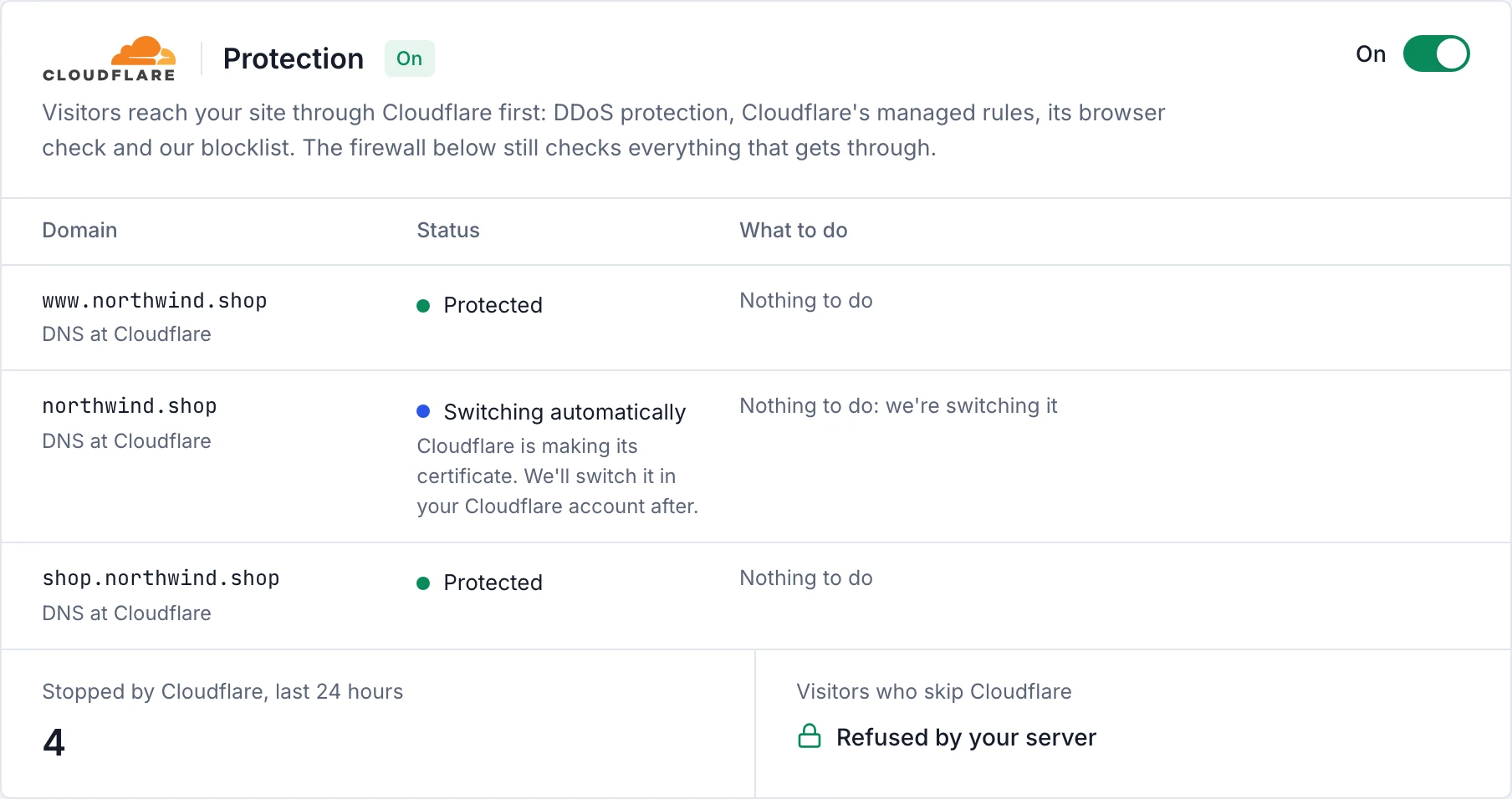
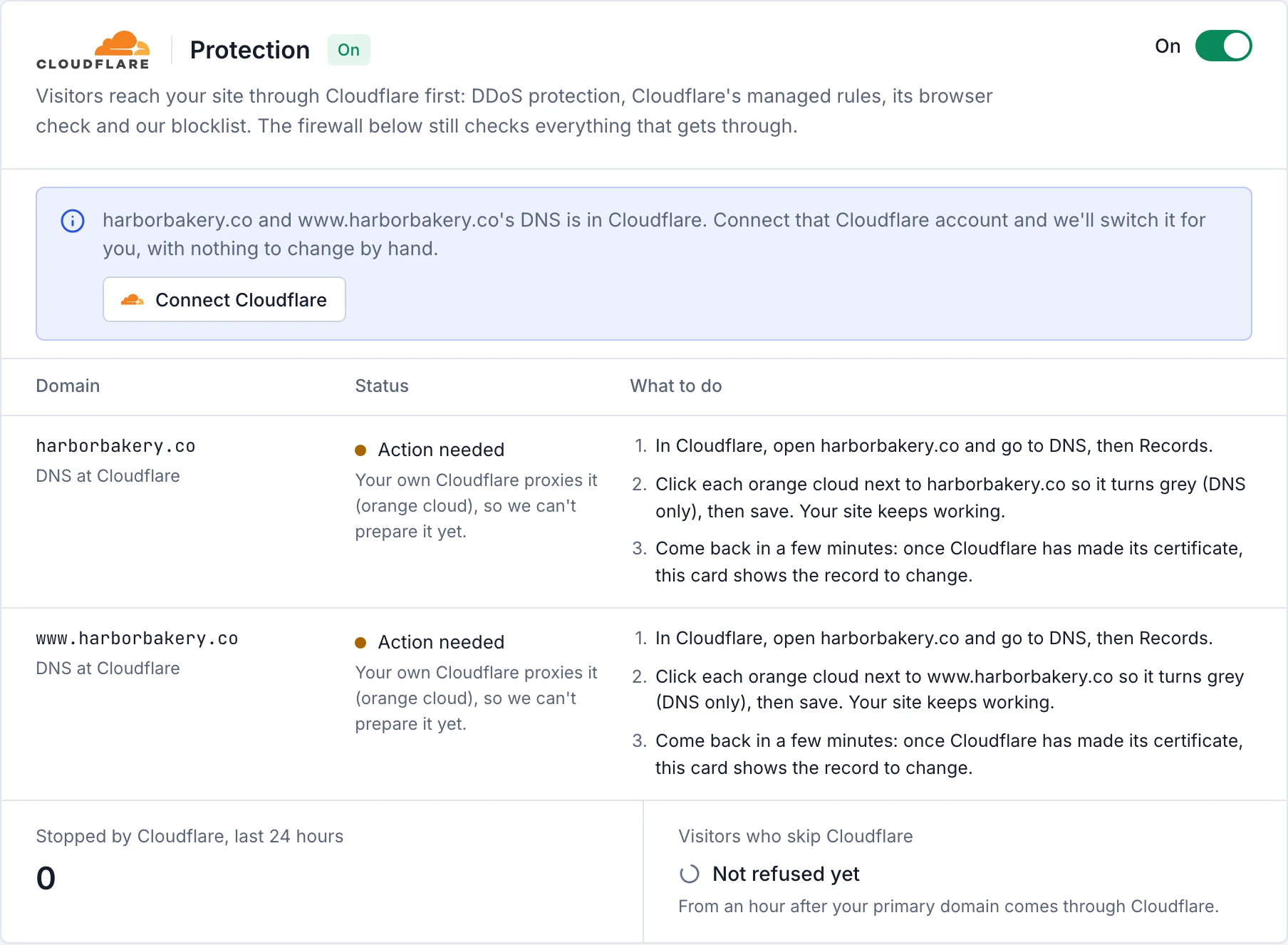
Connect that Cloudflare account to Rabbitflare, with the Connect Cloudflare button on the card or on the Cloudflare page, and we switch those domains for you. We turn your own Cloudflare's proxy off for the domain (DNS only), so ours can make its certificate while visitors still reach your site, then point the domain at the site's Cloudflare name. The card shows Switching automatically until it's done. Only the records that lead to your site are changed: your email records and everything else stay as they are.
Rather not connect it? The card shows the steps instead: in Cloudflare, click the orange cloud next to the domain so it turns grey (DNS only).
A few minutes later, when the card says Ready to switch, change the domain's record to a CNAME to the site's
Cloudflare name, still DNS only. Cloudflare takes a CNAME on a root domain (example.com) too.
Domains at any other DNS company
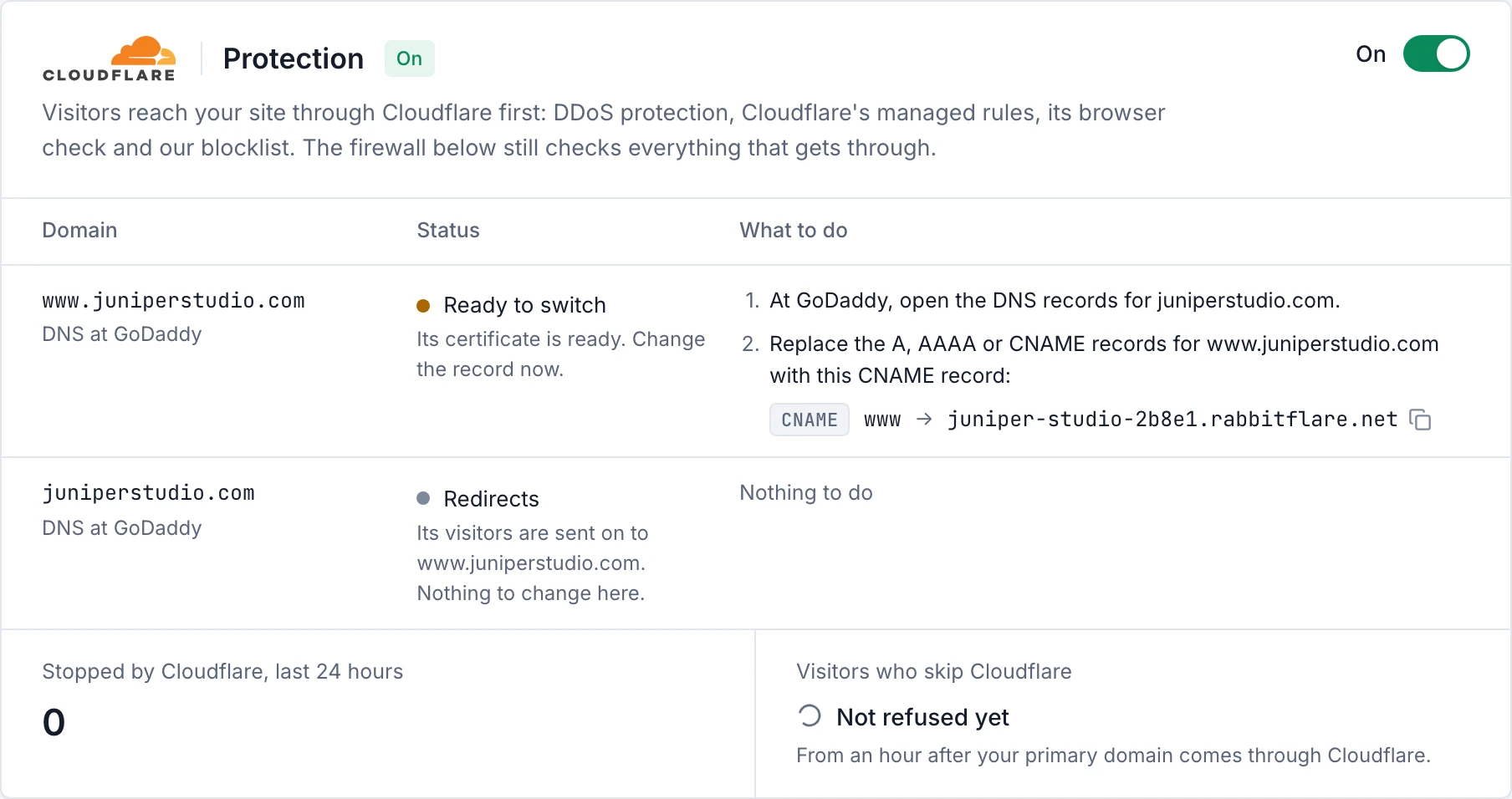
The card names your DNS company and shows the record to set there, with a Copy button. Change it once the domain says Ready to switch:
- www and other subdomains
- A
CNAMErecord to the site's Cloudflare name, for examplewww→shop.rabbitflare.net. - The root domain (example.com)
-
An
ALIASorANAMErecord to the site's Cloudflare name, where your DNS company has one (at Namecheap and Porkbun it's called ALIAS). Some companies, like GoDaddy, can't point a root domain at a name: then make www your primary domain, and the root keeps itsArecord. Its visitors are sent on to www, through Cloudflare, and the card shows it as Redirects.
Keep any MX and TXT records on the domain: they're for your email.
What the card's statuses mean
- Protected
- Its visitors come through Cloudflare. Nothing to do.
- Switching automatically
- We're switching it: bought from Rabbitflare, or its DNS is in your connected Cloudflare account. Nothing to do.
- Getting ready
- Cloudflare is checking the domain and making its certificate, which takes a few minutes. Nothing to change yet.
- Ready to switch
- Its certificate is ready: change its record now, as the card shows.
- Action needed
- Something comes first, like turning your own Cloudflare's orange cloud grey. The card says what.
- Redirects
- A root domain that can't point at a name: its visitors are sent on to your primary domain. Nothing to do.
- Not accepted
- Cloudflare refused the domain, for example because it's in use in another Cloudflare account. The card says why.
What Cloudflare does for your site
- DDoS protection
- Floods of requests are absorbed by Cloudflare's network, whatever their size.
- Managed rules
- Cloudflare's own rules against widespread attacks, kept up to date by Cloudflare.
- Browser check
- Requests with the marks of bad bots and attack tools are stopped.
- Our blocklist
- Addresses and networks we've seen attacking our customers are kept out of every protected site.
- Leaked passwords
- When someone who can edit your site signs in with a password that has appeared in a data breach elsewhere, WordPress asks them to set a new one first.
- Secure connections
- Visitors always use HTTPS, with TLS 1.2 or newer, and your domains get their certificates from Cloudflare.
See what Cloudflare stopped
The card shows how many requests Cloudflare stopped in the last 24 hours, and Stopped by Cloudflare, further down the tab, lists them: when, the page asked for, where it came from and why it was stopped. Your firewall's own security events are listed separately.
Turn it off
Switch it off on the card. Your server answers every domain directly again straight away. It can take up to 15 minutes to finish, so that visitors' devices let go of Cloudflare's address first, and your site keeps working the whole time. When none of the site's domains ever came through Cloudflare, it's done in about a minute.
- Domains we switched in your connected Cloudflare account are put back exactly as they were.
- Domains you pointed yourself keep working: the site's Cloudflare name now leads straight to your server. Point them back at your server whenever you like (the Domains tab shows the record).
Your site's firewall stays as it is.
Questions
- Do I need a Cloudflare account?
- No. Your domains go through our Cloudflare account; you only point their DNS at it.
- I already use Cloudflare for my domain
- Keep it for your DNS. Connect it to Rabbitflare and we switch the domain for you, or set its record yourself with the proxy off (DNS only, grey cloud): our Cloudflare then does the protecting. Your own Cloudflare's proxy can't sit in front of ours.
- Does it slow my site down?
- No: Cloudflare's network is close to your visitors, and most attacks never reach your server.