
Transfer a domain to Rabbitflare
Move a domain you registered elsewhere: check it, enter its transfer code and pay. The transfer adds a year, and your website and email keep working.
4 min read Updated
Registered a domain somewhere else? Move it to Rabbitflare and manage it next to your sites: its DNS, nameservers and forwarding, with free WHOIS privacy, renewing automatically so it never lapses. The transfer adds a year to the domain, and your website and email keep working while it moves.
Before you start
At the domain's current registrar:
- Unlock it
- Turn off the domain's transfer lock. Registrars call it different things, like "domain lock" or "registrar lock".
- Get its transfer code
- Also called an EPP or authorization code. The registrar shows it in its control panel, or emails it to you.
- Check its age
- A domain can't change registrar for 60 days after it's registered or transferred.
Transfer it
-
Check the domain
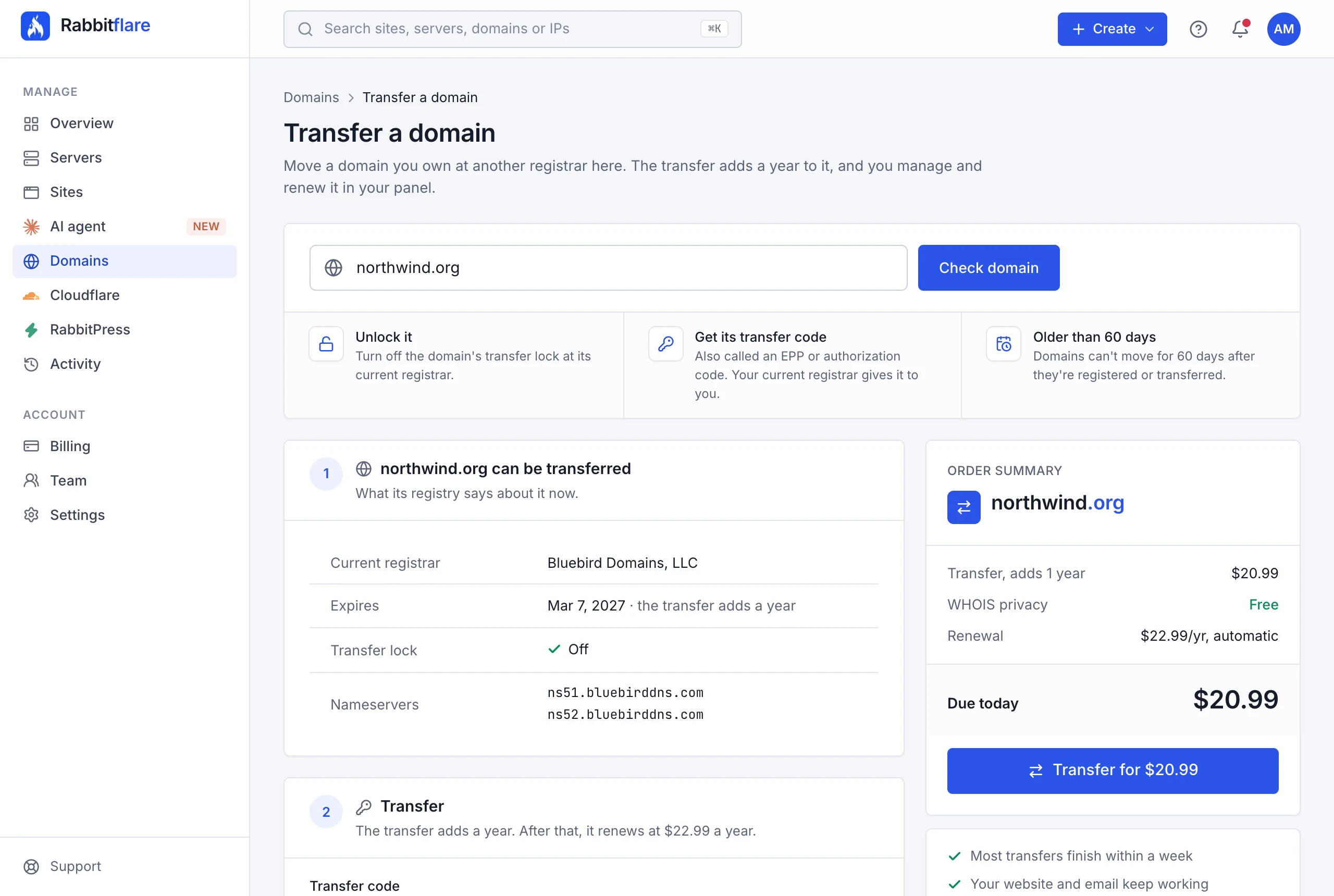
Open Domains Transfer domain , type the domain and choose Check domain. You'll see what its registry says about it, like its current registrar, expiry date and transfer lock, and the price of the transfer. If something stands in the way, like a lock that's still on, the page says what to do first.
-
Enter the transfer code and the details
- Transfer code
- The code from the current registrar, exactly as it gives it.
- WHOIS privacy
- Hides your name, address, email and phone from public domain lookups. Free, and on by default.
- Renew automatically
- Renews the domain 30 days before it expires, paid from your wallet first, then your saved card. You can turn it off at any time.
- Owner details
- The person or company the domain is registered to once it's here. Registries require real details; with privacy on, they aren't shown publicly.
-
Pay and transfer
Pay by card; funds in your wallet are used first. The price includes the year the transfer adds to the domain.
What happens next
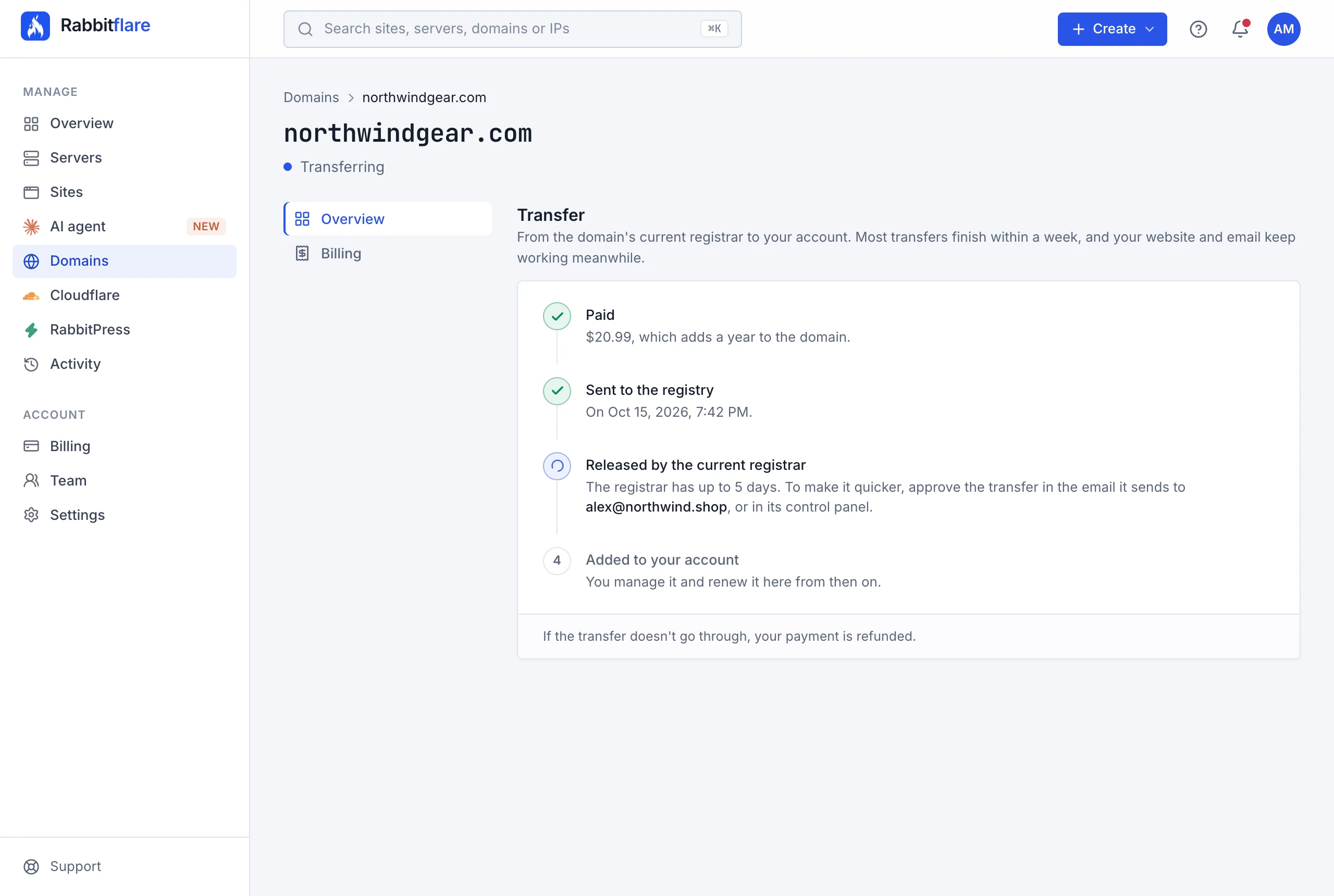
We send the transfer to the registry within a minute or two. The domain's current registrar then has up to 5 days to release it, so most transfers finish within a week. To make it quicker, approve the transfer in the email the current registrar sends, or in its control panel. The domain's page shows where the transfer stands, and we email you when it's done.
If the transfer waits for you
The domain's page, and an email, tell you what to do:
- The code wasn't accepted
- Codes often expire, or get mixed up when copied. Get a new one from the current registrar and choose Enter a new code.
- The domain is still locked
- Turn off its transfer lock at the current registrar. The transfer usually continues by itself; if not, choose Try again.
- The transfer was rejected
- The current registrar, or someone using the link in its email, rejected it. Check with the registrar, then choose Try again.
Trying again costs nothing more. A transfer that still waits for you after 30 days is canceled, and your payment refunded.
Cancel a transfer
Until the registry has the transfer, choose Cancel transfer on the domain's page: the domain stays where it is, and your payment is refunded. Once the registry has it, it can only be stopped at the current registrar, usually with the link in the email it sends. If a transfer doesn't go through for any other reason, we refund you and email you why.
After the transfer
The domain is managed like a domain registered here: see Register a domain for its DNS, nameservers, forwarding and renewals. It renews automatically 30 days before it expires, unless you turn that off.
The registry doesn't let a domain change registrar again for 60 days after a transfer. As with any domain here, the owner's email address may have to be confirmed: if so, the domain's page says so.