

 Imunify360 · included with 2 GB+ cloud servers
Attacks stopped at the door.
Malware cleaned on arrival.
Imunify360 guards the whole server: a firewall that knows the internet's attackers, a web application firewall, bot protection, and real-time malware scanning that cleans what it finds. It comes with Rabbitflare cloud servers, built in.
- On from the start on new servers
- Every site behind its firewall
- Undo any clean-up
How it protects
Every way in, shut.
How attackers try to get into a WordPress server, and what Imunify360 does about each. Most of it runs on the server, outside WordPress, where nothing on a site can switch it off; its WordPress plugin adds a guard inside each site.
-
Attempt 1
From an address known for attacks
198.51.100.12 → store.example.comGET /wp-login.phpDropped by the firewall
Firewall
A firewall that knows the attackers
Addresses known for attacks are blocked before they reach a site, from Imunify360's worldwide list and from what it sees on your server. Add your own: always allow your office, block a range or a whole country.
-
Attempt 2
Guessing the password, again and again
203.0.113.45 · admin / 123456 ✕203.0.113.45 · admin / password ✕ …Blocked after too many tries
Password guessing
No password guessing
An address that keeps getting SSH passwords wrong is blocked from the start. Turn on WordPress login protection, and the same goes for your sites' logins.
-
Attempt 3
A flood of connections
192.0.2.77 opens 600 connectionsto store.example.com, all at onceBlocked by DoS protection
DoS protection
Floods turned away
An address that opens more connections to the server at once than any visitor needs is blocked, so a flood from one place can't take your sites down.
-
Attempt 4
A bot pretending to be a browser
198.51.100.140 · “I'm Chrome 131”GET /shop/ ×40 a secondFailed the browser check
Bot protection
Bots get checked, people get in
Visitors that look like bots get a quick check in the browser instead of a block: real people pass in a second, bots don't. Search engines are always let through, and behind Cloudflare or another CDN it checks each visitor's real address.
-
Attempt 5
SQL injection in a search box
GET /?s=1' UNION SELECT user_passFROM wp_users--403: stopped before WordPress
Web application firewall
A web application firewall for WordPress
Imunify360's rules stop SQL injection, cross-site scripting, malicious uploads and attacks on known holes in WordPress, its plugins and themes, before your site's code runs.
-
Attempt 6
An exploit for a hole in an old plugin
POST /wp-admin/admin-ajax.phpaction=duplicator_download&file=../wp-config.php403: stopped inside WordPress
WordPress plugin
A guard inside WordPress too
Turn on Imunify360's WordPress plugin and it guards each site from inside: it knows which plugins and themes are installed, in which versions, and what the signed-in user may do, so it stops attacks on their known holes. Its AI bot protection limits how fast AI crawlers and scrapers load pages.
-
Attempt 7
A backdoor, uploaded with a stolen password
wp-content/uploads/2026/11/cache.php@eval( base64_decode( $_POST['x'] ) );Cleaned the moment it landed
Malware scanning
Malware cleaned the moment it lands
On each site you turn it on for, every file is checked as it's uploaded or changed, and the whole site every day, its database included. The malicious code is removed and the rest of the file kept, with a copy to undo it.
-
Attempt 8
Through a hole in the Linux kernel
A kernel security fix is releasedand attackers start looking for servers without itPatched while the server runs
KernelCare
Kernel patches without a restart
KernelCare applies the Linux kernel's security fixes while the server runs, so it's patched without a reboot and your sites never go offline for it.






- Vulnerable plugins flagged Plugins, themes and WordPress installs with known security holes are listed, each hole with its CVE.
- Search engines let through Google, Bing and other search engines are never checked or blocked. Add any other in the panel.
- Blacklist monitoring Checks every day whether one of your domains is on a blacklist, and tells you.
- Email alerts Malware found, a clean-up done, a plugin with known holes, a domain blacklisted: an email, once, for each.
- Every incident listed What was stopped, where and why, with one click to allow an address or turn a rule off for a site.
- Your own rules Always allow your office, block a range or a country, ask for a CAPTCHA, close ports.
In your control panel
All of it, on one page.
Each server has an Imunify360 page: what was stopped, what was found and cleaned, and every setting, in plain words. Each site has its own tab too.
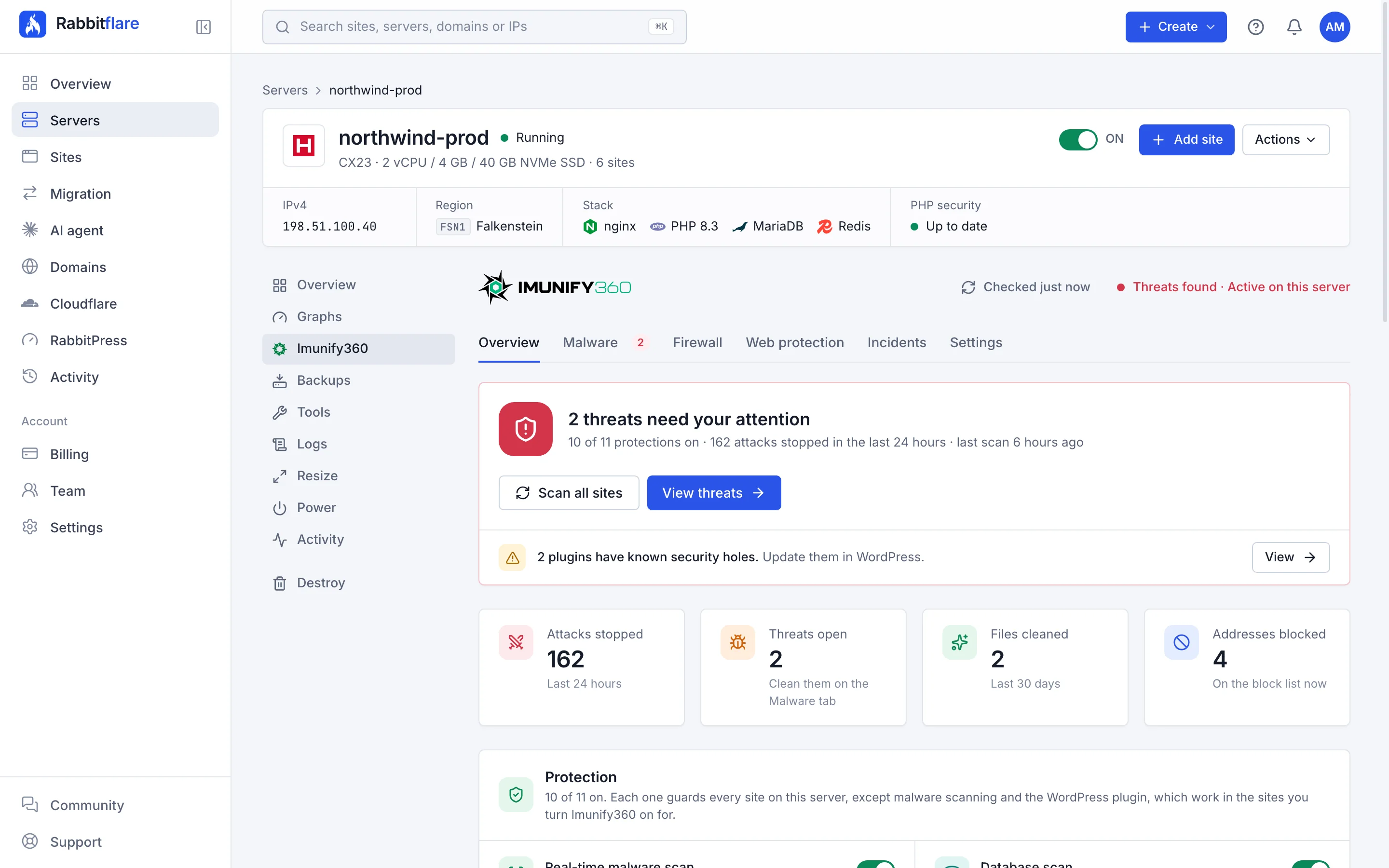
Everything that guards the server, on one page
The server's Imunify360 page opens on what matters: attacks stopped in the last 24 hours, threats to clean, every protection with its switch, the sites and the latest incidents.
- Every protection on or off with one switch
- The sites with malware scanning, and what each costs
- The latest incidents, in plain words
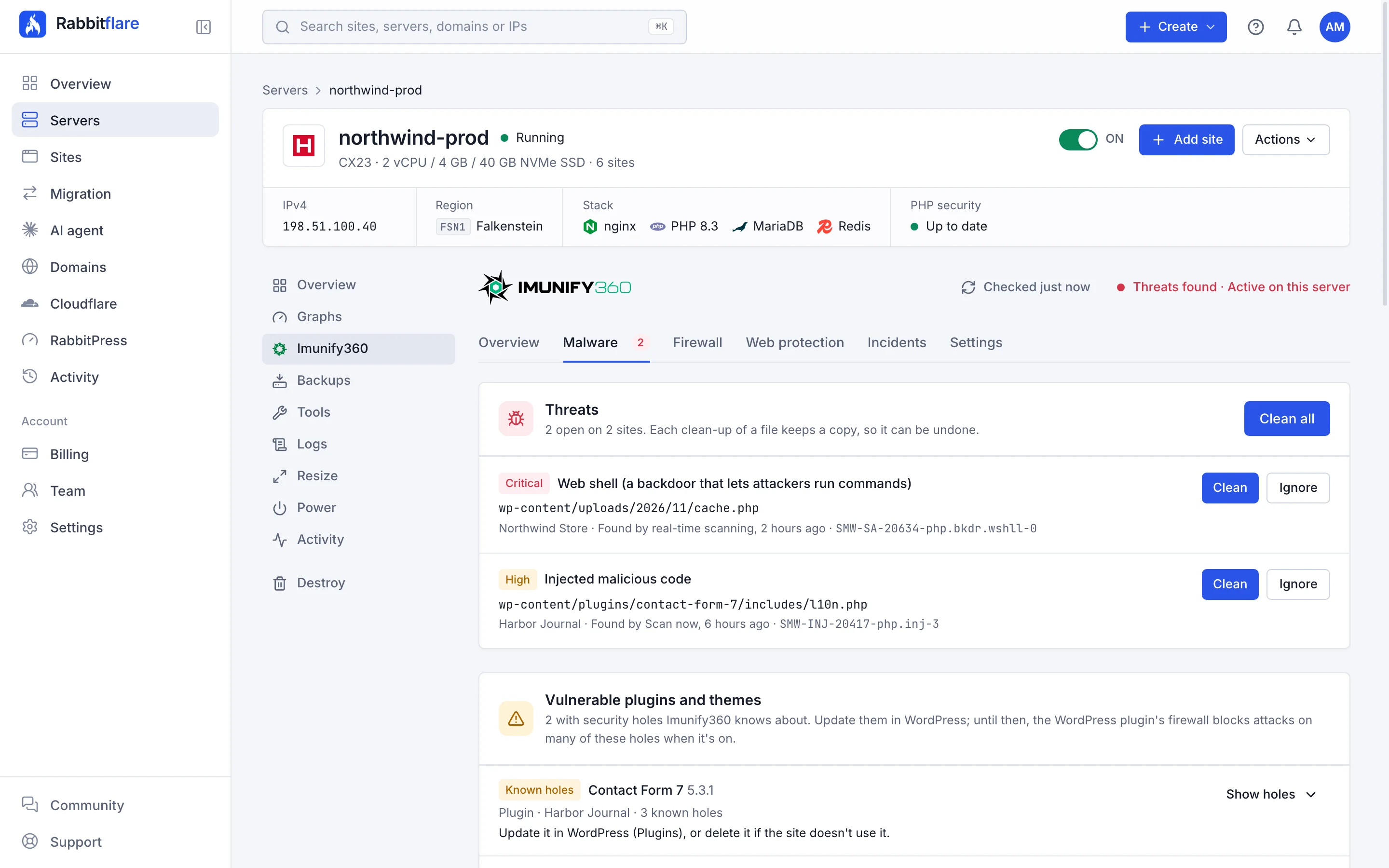
What was found, and what was cleaned
Threats still open, each with Clean and Ignore, then the plugins and themes with known security holes, each hole with its CVE, and everything Imunify360 cleaned by itself, each with Undo. Under them, how the scans run.
- Undo any clean-up for 14 days
- Clean automatically, or only alert you
- Out-of-date plugins with known holes, listed
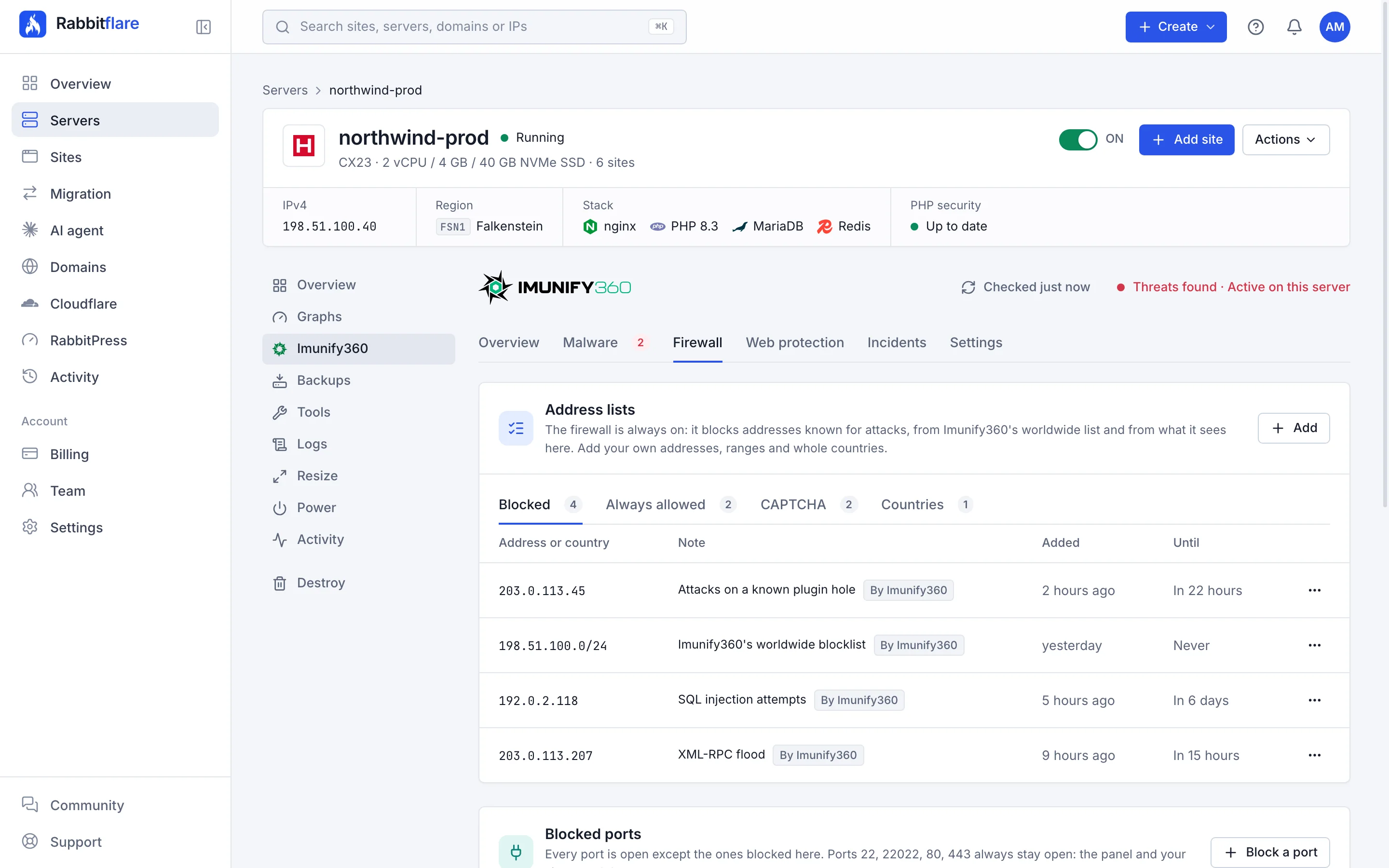
The firewall, your way
Addresses, ranges and whole countries on the always-allowed, blocked or CAPTCHA lists, for good or for a while. Ports to close, DoS limits, and SSH password-guessing protection.
- Always allow your office
- Block a range or a country
- Web and SSH ports can never be closed by mistake
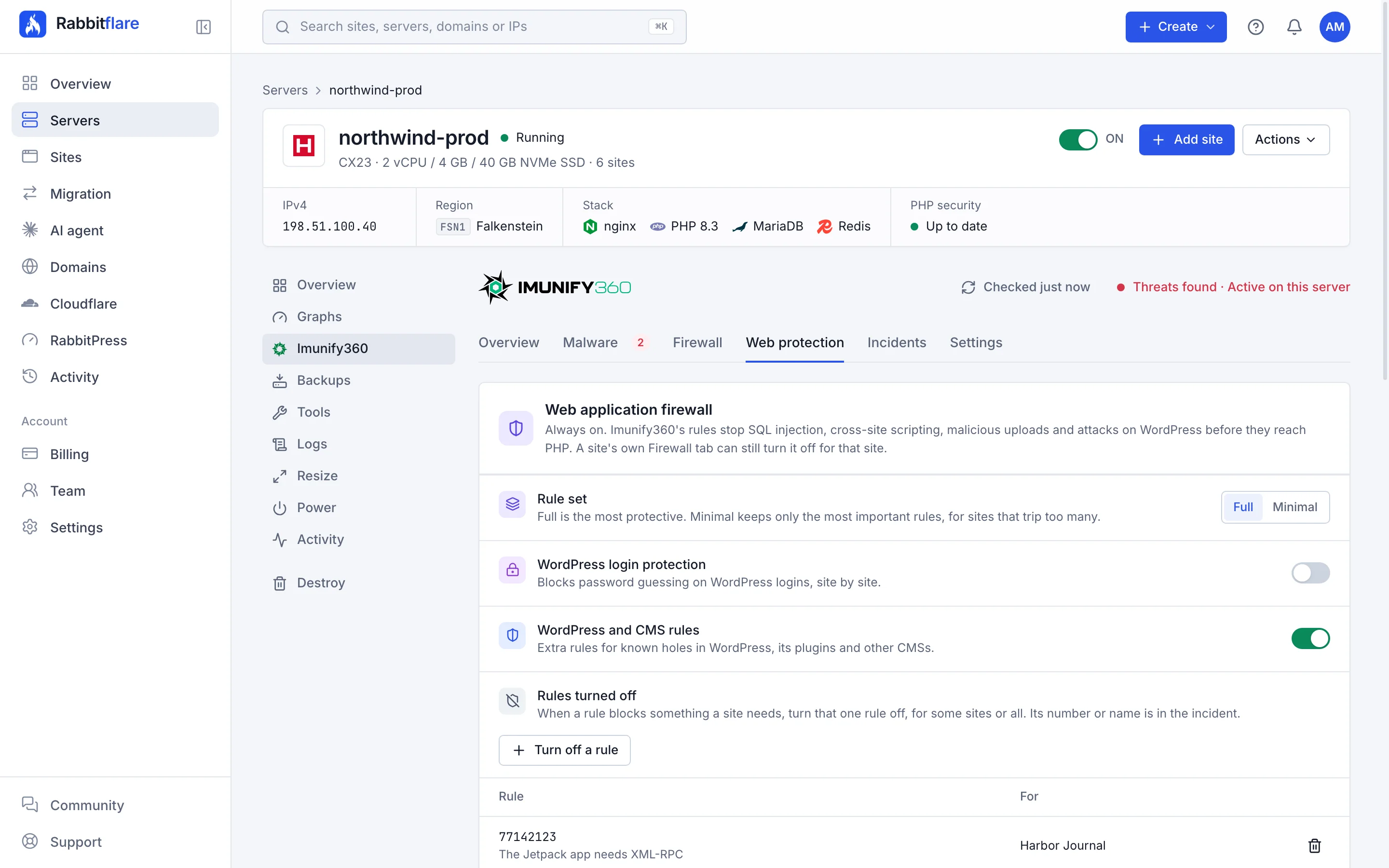
The web application firewall and bot protection
The rule set, WordPress login protection and the extra rules for WordPress and its plugins, rules turned off where a site needs it, and the CAPTCHA and browser check for suspicious visitors, with the search engines always let through.
- Full or minimal rule set
- A rule off for one site, not all
- Real visitors' addresses behind Cloudflare
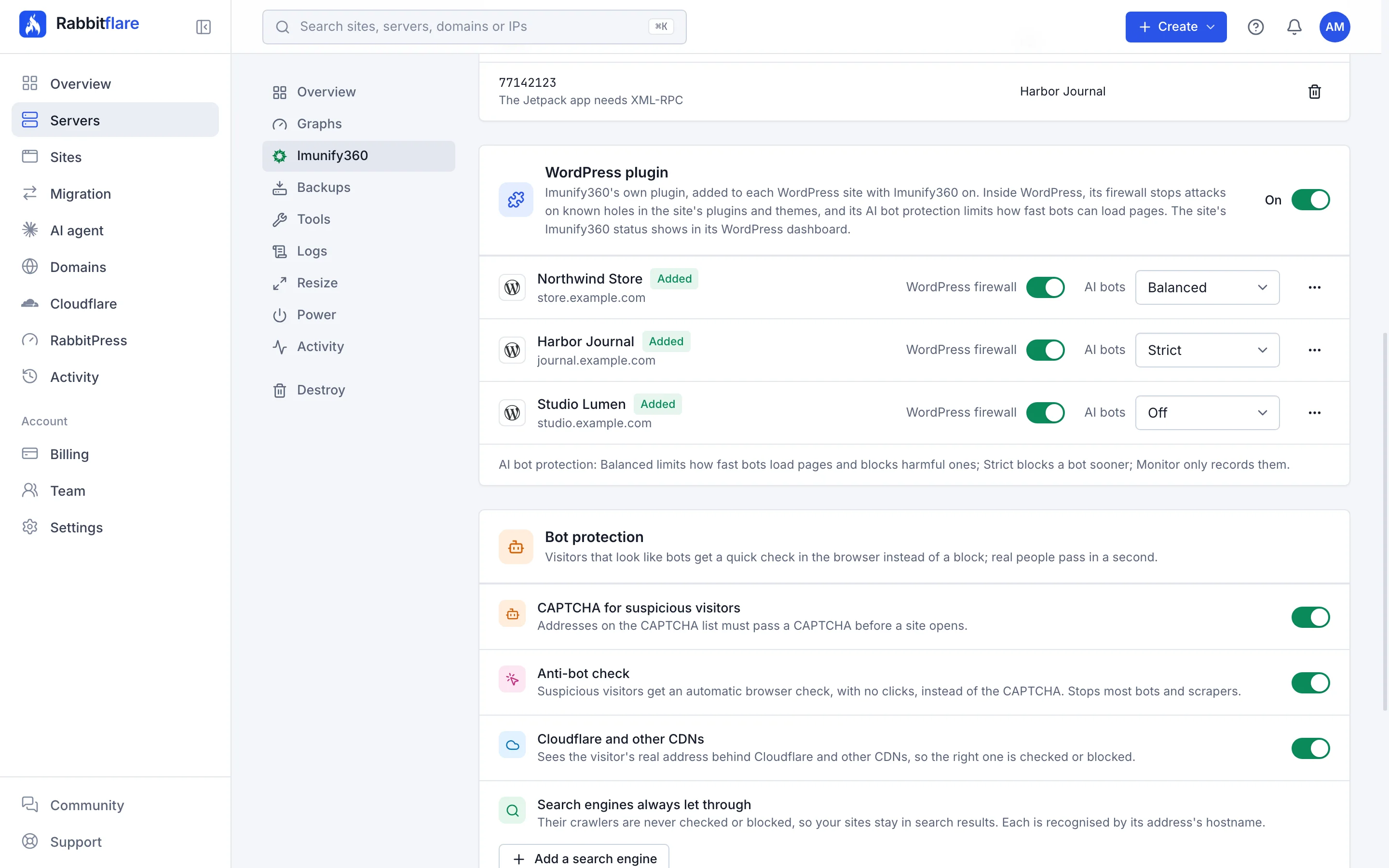
Imunify360's WordPress plugin, site by site
Turn it on for the server and it's added to every site with malware scanning. Each site has its own WordPress firewall switch and its own AI bot protection: Balanced, Strict or Monitor only.
- Added and kept up to date for you
- Stops attacks on known plugin holes
- AI crawlers and scrapers kept in check
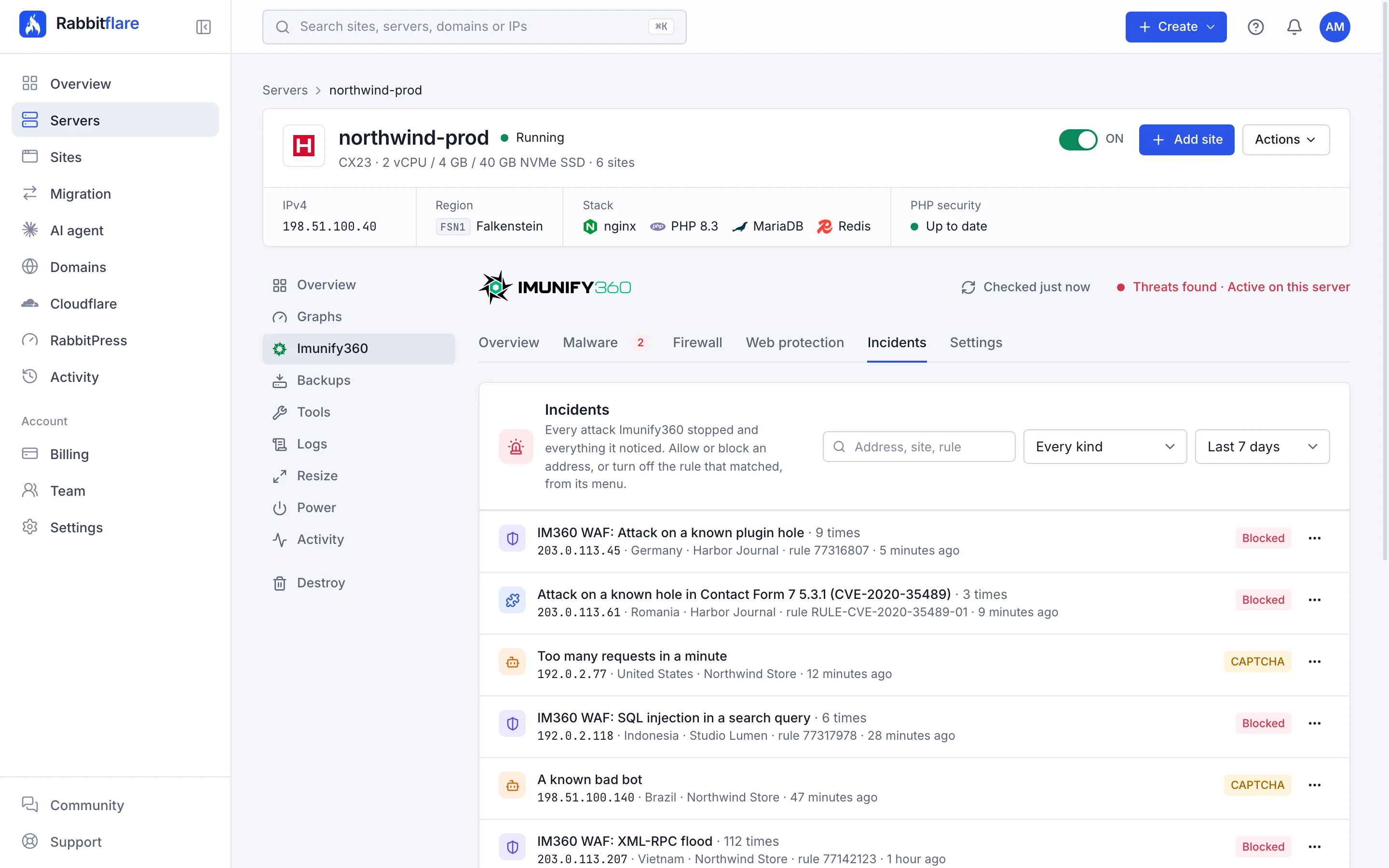
Every incident, with what to do about it
What was stopped, when, on which site and why, the WordPress plugin's attacks among them, filtered as you like. Allow or block the address, or turn the rule that matched off for that site, from the same row.
- Filter by site, kind and address
- Allow an address in one click
- Fix a false alarm without touching the rest
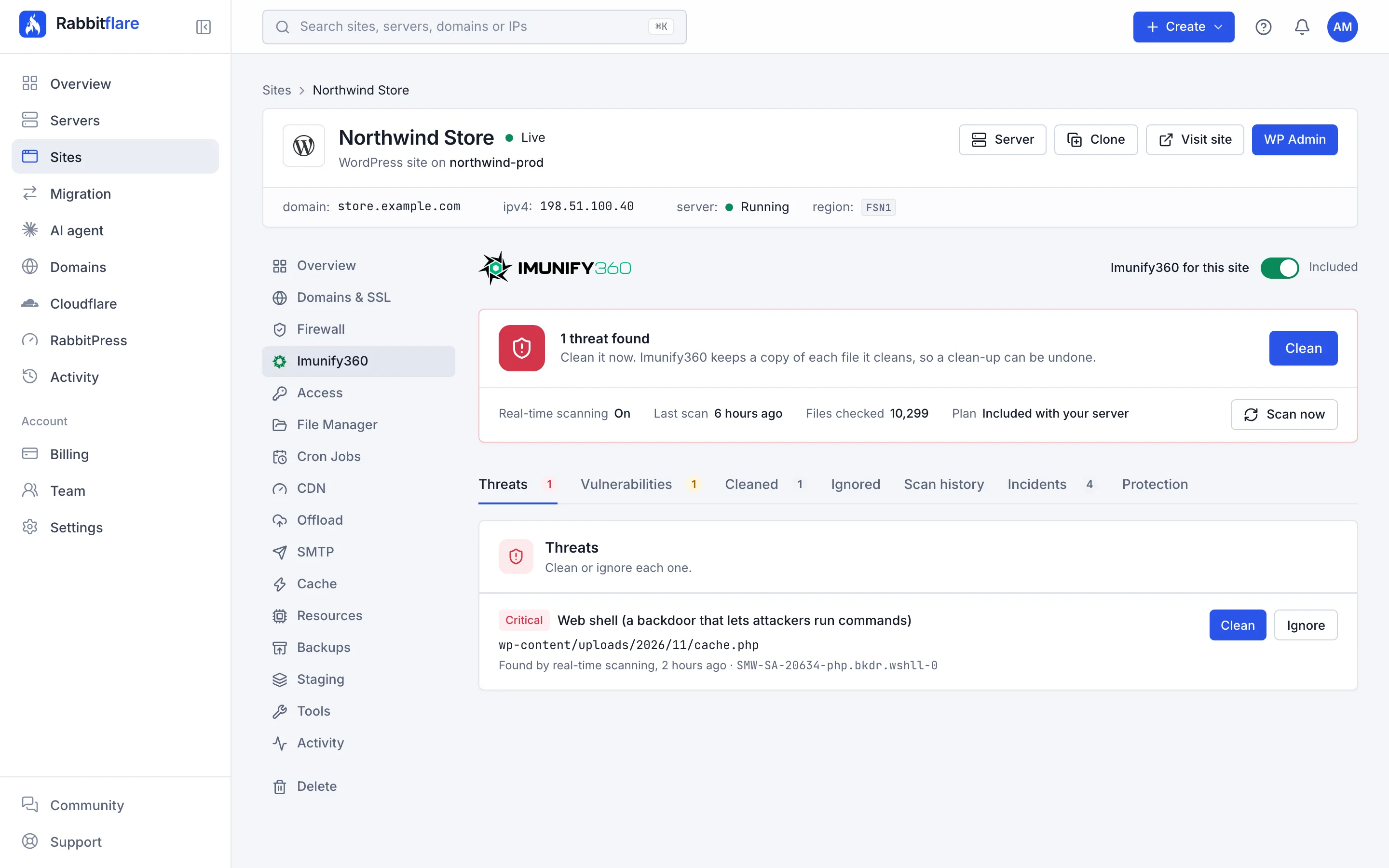
Each site has its own Imunify360 tab
Its threats and clean-ups, its plugins with known holes, its scans, the incidents on it, its email alerts and its WordPress plugin, with the switch for malware scanning. One site per server is included; each other site is $2.99 a month.
- Turn malware scanning on per site
- Scan the site now
- Email alerts on or off for it
Included
Built into your server.
Nothing to install and nothing to set up. Imunify360 comes with Rabbitflare cloud servers of 2 GB or more, with Intel or AMD processors, and it's on from the start on new ones.
Arm sizes, Amazon EC2, smaller sizes and servers you connect with Bring your own server keep our standard web application firewall: ModSecurity with the OWASP Core Rule Set, on every site.
Every site on the server
Included
- Firewall with Imunify360's worldwide blocklist
- Web application firewall with WordPress rules
- Bot protection with a browser check
- DoS and password-guessing protection
- Your own allow, block and CAPTCHA lists
- KernelCare: kernel patches without a restart
- Blacklist monitoring for your domains
- Every incident listed, with email alerts
Malware scanning and clean-up
1 site included
Then $2.99 a month for each other site
- Real-time scanning of every new or changed file
- A full scan every day, the database included
- Automatic clean-up that keeps the rest of the file
- A copy of each cleaned file, to undo it for 14 days
- Plugins and themes with known security holes listed
- The WordPress plugin, when you turn it on: a firewall and AI bot protection inside WordPress
Turn it on for the sites you choose, up to 30 on a server. Billed after each month for the days it was on; staging copies are never part of it.
Questions
Good to know.
Getting started 4
Which servers come with Imunify360?
Servers Rabbitflare creates for you with Intel or AMD processors and 2 GB of memory or more. Arm sizes, Amazon EC2, smaller sizes and servers you connect yourself don't have it: their sites keep our standard web application firewall, ModSecurity with the OWASP Core Rule Set.
How do I turn it on?
It's on from the start on new servers. On a server you already have, open it in the control panel, go to Imunify360 and turn it on: it's set up in about 5 minutes, and your sites stay online meanwhile. Then choose which sites get malware scanning.
What happened to Rabbit Shield?
Imunify360 took its place. Rabbit Shield has been removed from every server; turn Imunify360 on from a server's Imunify360 page in the control panel.
Is it part of the free trial?
No. Imunify360 comes with paid servers of 2 GB or more. During the trial, your sites have our standard web application firewall.
Protection 6
What if it blocks something of mine?
Every incident is listed on the server's Imunify360 page, with why it was blocked. Allow the address in one click, or turn the rule that matched off for that site. Your office and your uptime monitor can go on the always-allowed list.
Will it slow my sites down?
It's built to stay out of the way: the firewall stops attackers before they reach WordPress, and scheduled scans run at a low priority, skipping files that haven't changed since the last scan.
Does it work with Cloudflare?
Yes. It sees each visitor's real address behind Cloudflare and other CDNs, so the right address is checked or blocked.
Do I still need a security plugin?
Not for these defences. Imunify360 works on the server, outside WordPress, so a plugin that's switched off or a compromised site doesn't switch it off. It also has its own WordPress plugin, included: turn it on to guard each site from inside WordPress too. You can keep a plugin you like.
What does its WordPress plugin add?
A firewall inside WordPress that knows which plugins and themes a site has, in which versions, and stops attacks on their known holes, and AI bot protection that limits how fast AI crawlers, scrapers and other bots load pages and blocks harmful ones. Turn it on for a server, and it's added to every site with malware scanning; set its firewall and how strict AI bot protection is (Balanced, Strict or Monitor only) site by site.
Will search engines be blocked?
No. Bot protection always lets Google, Bing, Yandex and Baidu through, recognised by their addresses' hostnames, and you can add any other search engine in the control panel.
Malware 4
What happens when malware is found?
Imunify360 cleans it straight away: the malicious code is removed, the rest of the file is kept, and so is a copy of the file as it was, for 14 days, so the clean-up can be undone. You get an email. Rather decide yourself? Set it to only alert you, and clean from the Malware tab.
Can it clean a site that was hacked before it moved here?
Yes. Turn malware scanning on for the site and scan it from the Malware tab: what's found is cleaned, with a copy kept, as on any other site.
Does it check the database too?
Yes. Each site's WordPress database is checked for injected code as part of its scans.
Does it find plugins with security holes?
Yes. On each site with malware scanning, Imunify360 lists the plugins, themes and WordPress installs with security holes it knows about, each hole with its CVE, so you know what to update. Meanwhile, its WordPress plugin's firewall blocks attacks on many of these holes, when it's on.
Price 2
What does it cost?
Imunify360 is included with your server: its firewall, web application firewall, bot, DoS and login protection, KernelCare and blacklist monitoring cover every site on it, and malware scanning and clean-up are included for one site. Each other site you turn malware scanning on for is $2.99 a month.
How is it billed?
After each month, for the days a site had malware scanning on, from your wallet first and then your saved card. Staging copies are never part of it, and your included site is never billed. Up to 30 sites on a server can have malware scanning.
The guides

Let the server stand guard.
Create a server with 2 GB or more, and every site on it starts behind Imunify360.